

Hello @TMroy and others,
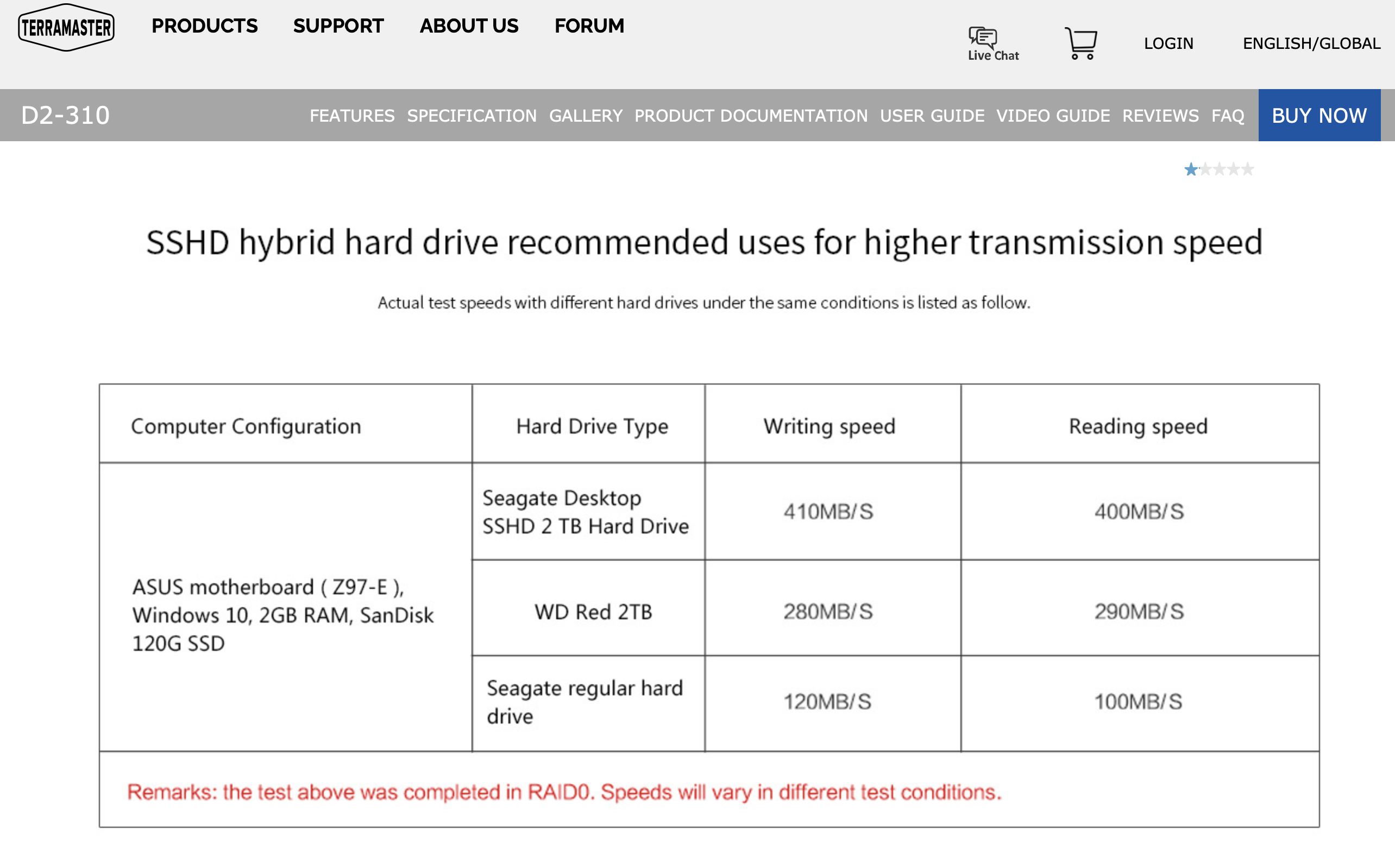
I am trying to transfer (back-up) data on my F5-221 to another Terramaster product, the D2-310. The D2-310 is plugged directly into the back of the F5-221 using USB 3.0 cables. The specs on the D2-310 boast an "actual copy speed of 410MB/sec" and yet I am maxing out at about 25MB/sec and averaging less.
So far I am 12 hours in and the displays simply says "about a day" left to move over the data. Anyone know why this might be or how I can speed this up?
Slow Transfer Speeds


Re: Slow Transfer Speeds
To contact our team, please send email to following addresses, remember to replace (at) with @:
Support team: support(at)terra-master.com (for technical support only)
Service team: service(at)terra-master.com (for purchasing, return, replacement, RMA service)
Support team: support(at)terra-master.com (for technical support only)
Service team: service(at)terra-master.com (for purchasing, return, replacement, RMA service)
Re: Slow Transfer Speeds
Oh yes, the small print. Well i have Seagate Ironwolf drives in both Terramaster devices and am still maxing out at maybe 28MB/sec and average even less. This is a far cry from even the low 120MB/Sec in your "test condition". I am now into day two of trying to back up the data on the F5-221 so I can prep (repartition) for TOS 5.1.67.TMroy wrote: ↑27 Sep 2023, 09:49 Do not ignore the test condition.
https://www.terra-master.com/global/pro ... 2-310.html
Re: Slow Transfer Speeds
what tool did you use to transfer your files from tnas to your usb?
To contact our team, please send email to following addresses, remember to replace (at) with @:
Support team: support(at)terra-master.com (for technical support only)
Service team: service(at)terra-master.com (for purchasing, return, replacement, RMA service)
Support team: support(at)terra-master.com (for technical support only)
Service team: service(at)terra-master.com (for purchasing, return, replacement, RMA service)
Re: Slow Transfer Speeds
Hello TMroy,
I have the D2-310 plugged directly into one of the USB ports on the back of the F5-221 and using Windows File Manager via Mapped network drive to transfer between the devices. As of now it has been over 48hrs since I started, it says 75% complete and advises still over a day to finish. Transfer speeds still maxing out at about 28MB and averaging much less.
Re: Slow Transfer Speeds
To have better transfer speed, you better transfer your file directly from your TNAS to your USB by using TOS File Manager, This way, the data will not need to be read by your computer and then written back to TNAS. Moreover, the layers deep in your folder, and file size and file quantity could also slow down your transfer speed.
To contact our team, please send email to following addresses, remember to replace (at) with @:
Support team: support(at)terra-master.com (for technical support only)
Service team: service(at)terra-master.com (for purchasing, return, replacement, RMA service)
Support team: support(at)terra-master.com (for technical support only)
Service team: service(at)terra-master.com (for purchasing, return, replacement, RMA service)

Re: Slow Transfer Speeds
I tried to copy 217 GB from a USB drive using a USB Copy Task to a folder in my F2-423 and after a few hours it was still stuck on 13% and no update on the screen.
Finally, I connected the USB drive to a PC and copied the 217 GB to the TNAS. Not sure if faster, but at least I got some sort of update.
Finally, I connected the USB drive to a PC and copied the 217 GB to the TNAS. Not sure if faster, but at least I got some sort of update.

Re: Slow Transfer Speeds
What is your device model and TOS version? Can you see what the file being backed up is on the page? Perhaps you can try moving this file first. If you meet the update criteria, you can update the latest TOS and applications.TOS 5.1.79: viewtopic.php?f=28&t=5278manya2000 wrote: ↑11 Nov 2023, 10:15 I tried to copy 217 GB from a USB drive using a USB Copy Task to a folder in my F2-423 and after a few hours it was still stuck on 13% and no update on the screen.
Finally, I connected the USB drive to a PC and copied the 217 GB to the TNAS. Not sure if faster, but at least I got some sort of update.
Additionally, you can check if there are any error log displays in USB Copy.
To contact our team, please send email to following addresses, remember to replace (at) with @
Technical team: support(at)terra-master.com (for technical support)
Service team: service(at)terra-master.com (for purchasing, return, replacement)
Technical team: support(at)terra-master.com (for technical support)
Service team: service(at)terra-master.com (for purchasing, return, replacement)