
I have a brand new T6-423, and I would like to use the TOS 5.1 File Manager to copy files over from my old NAS (Synology DS1520+), rather than using Windows Explorer. I set up a Remote SMB folder in TOS, and the name/password seem to work (i.e., TOS complains if I mistype either), but after creation the Remote folder item shows "Not enabled". This doesn't make sense/. I have looked around quite a bit via Google and in this forum for help, but see nothing useful. I have tried to mount the remote folder in the public shared folder, and in a folder that I created, but no luck either way.
What am I missing? Thanks!
Remote SMB folder -- not enabled??

Re: Remote SMB folder -- not enabled??
Can you take a screenshot of the setting interface and the "Not enabled" prompt?
It may be a problem with the format or directory, you can try to use only the highest level directory, and make sure your format is consistent with the format below the input box.
It may be a problem with the format or directory, you can try to use only the highest level directory, and make sure your format is consistent with the format below the input box.
To contact our team, please send email to following addresses, remember to replace (at) with @:
Technical team: support(at)terra-master.com (for technical support)
Service team: service(at)terra-master.com (for purchasing, return, replacement, RMA service)
Technical team: support(at)terra-master.com (for technical support)
Service team: service(at)terra-master.com (for purchasing, return, replacement, RMA service)
Re: Remote SMB folder -- not enabled??
Sure. I have attached two screenshots, one showing the configuration and the other showing the "not enabled" status

Re: Remote SMB folder -- not enabled??
Hello, please try to select the remote folder and click the Enable button.
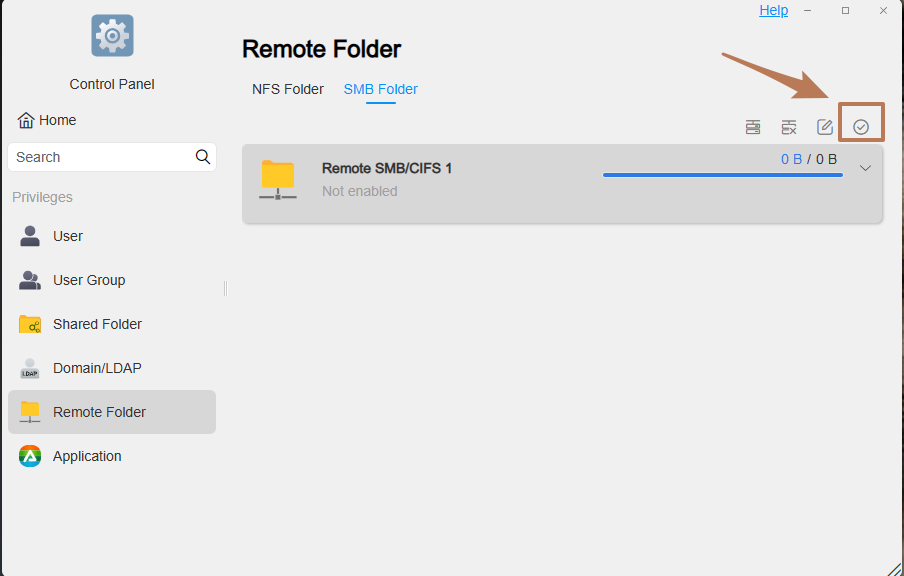
To contact our team, please send email to following addresses, remember to replace (at) with @:
Technical team: support(at)terra-master.com(for technical support)
Service team: service(at)terra-master.com(for purchasing, return, replacement, RMA service)
Technical team: support(at)terra-master.com(for technical support)
Service team: service(at)terra-master.com(for purchasing, return, replacement, RMA service)
Re: Remote SMB folder -- not enabled??
Duh! That did it -- I probably should have noticed that checkbox. Thanks!!!


Re: Remote SMB folder -- not enabled??
Not really. Terrible contrast in the GUI sometimes makes them hard to determine acvtive/inactive.
F5-221 TOS7.0.1278 - 4x4TB (Ironwolf) Traid
F2-424 TOS7.0.1278 - 2x500GB nvme (P3) Traid, 2x6TB HDD (HGST) Traid
F2-221 TOS7.0.1278 - 1x3TB Ext4, 1x4TB Btrfs
F2-425+ TOS7.0.1278 - 2x500GB nvme (P3) Traid, 2x6TB HDD (EXOS) Traid
F2-424 TOS7.0.1278 - 2x500GB nvme (P3) Traid, 2x6TB HDD (HGST) Traid
F2-221 TOS7.0.1278 - 1x3TB Ext4, 1x4TB Btrfs
F2-425+ TOS7.0.1278 - 2x500GB nvme (P3) Traid, 2x6TB HDD (EXOS) Traid