TOS 6.0.420 Beta Is Available for Testing

Official news about TOS, mobile app, PC app updates or beta releases.
User avatar
TMzethar
TM Support
Posts: 2819
Joined: 27 Oct 2020, 16:43

Re: TOS 6.0.420 Beta Is Available for Testing

Post by TMzethar »

Tom wrote: 13 Sep 2024, 22:01
It seems that your F5-221 is compatible with TOS6.
Regarding the boot problems you are experiencing, it is possible that one of the disks has a corrupted boot partition.
Regarding the other three problems you mentioned, they seem to be UI display errors, so please observe whether the CPU/RAM usage is too high, and try to clear the browser cache.
To contact our team, please send email to following addresses, remember to replace (at) with @:
Technical team: support(at)terra-master.com (for technical support)
Service team: service(at)terra-master.com (for purchasing, return, replacement, RMA service)
User avatar
DanielB
Posts: 14
Joined: 21 Jul 2024, 02:02
Canada

Re: TOS 6.0.420 Beta Is Available for Testing

Post by DanielB »

Tom wrote: 12 Sep 2024, 22:47 I have a F5-221 was running TOS 6.0.229 and attempted to update to 6.0.420 now the NAS isn't seen online and I can't connect over the network.
I scanned the network using NMAP and checked my router for connected devices and the NAS hasn't got any IP address assigned.
This probably isn't it but I'll throw it out here as a possibility: after I updated yesterday from 229 to 420 and restored a few settings, I found that in Windows the drive letters I had previously mapped to my TNAS no longer worked, and nor could I access the TNAS from my phone's file browser (also previously mapped to it). I was puzzled but quickly realized why: under TOS Control Panel->Network, the Device Name had been reset by the upgrade from what I'd previously named it ("TNAS-F2-424") to "TNAS". This meant that all my drive mappings that used the address "https://tnas-f2-424.local/{shared folder}" were now invalid as they were now mapped to "https://tnas.local/{shared folder}".

If by chance you had assigned a reserved IP address in your router using the device name formatted address, it follows that the upgrade changing the device name on you would make the TNAS unavailable over the network.

And IF that was the case and you can't get into TOS remotely because of that you might want to temporarily remove the reserved IP address from your router or switch to a number based address.
F2-424 w 1x 250GB WD SN580 Blue NVMe (TOS6.0.519) + 2x 4TB WD Red Plus 3.5"HDDs
User avatar
TMzethar
TM Support
Posts: 2819
Joined: 27 Oct 2020, 16:43

Re: TOS 6.0.420 Beta Is Available for Testing

Post by TMzethar »

DanielB wrote: 14 Sep 2024, 09:24 This probably isn't it but I'll throw it out here as a possibility: after I updated yesterday from 229 to 420 and restored a few settings, I found that in Windows the drive letters I had previously mapped to my TNAS no longer worked, and nor could I access the TNAS from my phone's file browser (also previously mapped to it). I was puzzled but quickly realized why: under TOS Control Panel->Network, the Device Name had been reset by the upgrade from what I'd previously named it ("TNAS-F2-424") to "TNAS". This meant that all my drive mappings that used the address "https://tnas-f2-424.local/{shared folder}" were now invalid as they were now mapped to "https://tnas.local/{shared folder}".
Sorry for the trouble.
The recently released TOS 6 beta does default the device name to “TNAS”. This is to make it easier to find the device using “tnas.local/”.
To contact our team, please send email to following addresses, remember to replace (at) with @:
Technical team: support(at)terra-master.com (for technical support)
Service team: service(at)terra-master.com (for purchasing, return, replacement, RMA service)
User avatar
Gremlin
Gold Member
Posts: 1628
Joined: 02 Dec 2022, 22:31
Great Britain

Re: TOS 6.0.420 Beta Is Available for Testing

Post by Gremlin »

TMzethar wrote: 14 Sep 2024, 10:52 The recently released TOS 6 beta does default the device name to “TNAS”. This is to make it easier to find the device using “tnas.local/”.
{Off topic a bit} That's OK for most (I guess) but in my case (and those other brave soles using Gigaclear for example) I have an isp assigned wan address. They use DHCP to assign this and the default domain assigned is 'routerlogin.net'. This can only be changed if the router is set to 'static' (for example) which allows editing of the local domain. Which, obviously, would not be a good idea.

Are you saying that the tos software will automatically assign .local even if the local dhcp is saying something different? As it happens I use a static ip for the nas and it does not respond to {nas}.routerlogin.net but it does respond to {nas}.local. How can I change that behaviour? (other than using dhcp for the nas.)
F5-221 TOS7.0.0777 - 4x4TB (Ironwolf) Traid
F2-424 TOS7.0.0777 - 2x500GB nvme (P3) Traid, 2x6TB HDD (HGST) Traid
F2-221 TOS7.0.0777 - 1x3TB Ext4, 1x4TB Btrfs
F2-425+ TOS7.0.0777 - 2x500GB nvme (P3) Traid, 2x6TB HDD (EXOS) Traid
User avatar
Tom
Posts: 8
Joined: 11 Jul 2023, 21:14
Ireland

Re: TOS 6.0.420 Beta Is Available for Testing

Post by Tom »

Tricky wrote: 14 Sep 2024, 04:04
Tom wrote: 12 Sep 2024, 22:47 I have a F5-221 was running TOS 6.0.229 and attempted to update to 6.0.420 now the NAS isn't seen online and I can't connect over the network.
I scanned the network using NMAP and checked my router for connected devices and the NAS hasn't got any IP address assigned.
I connected a monitor to HDMI port on back of NAS and it boots into grub> command line. I'm not familiar with grub commands so don't know what I should do.
I like you have an F5-221 that I originally updated to TOS6 with no problems and I am sure that initially, the list of compatible devices included the F5-221! I am running the 6.0.229 and recently tried to update to the 6.0.420 without success just got an error message, interesting that we beta tested and then all of a sudden the device is no longer compatible, I have spent the last four years having to reboot/rebuild my TNAS file system and am now looking for another make that has more stable software.
I did get mine to work after putting copilot to work that walked me through the grub commands and I'm now at TOS version 6.0.461 to be honest it seems to have more bugs than 6.0.229. I'm of the opinion that Terramaster while striving to make improvements just can't make that leap and spends too much time on apps that aren't core to what a NAS needs to be. A lot of people have switched to TrueNAS. I don't want to go that route and will wait until TOS 6 is out of Beta to make a decision.
User avatar
Tom
Posts: 8
Joined: 11 Jul 2023, 21:14
Ireland

Re: TOS 6.0.420 Beta Is Available for Testing

Post by Tom »

DanielB wrote: 14 Sep 2024, 09:24
Tom wrote: 12 Sep 2024, 22:47 I have a F5-221 was running TOS 6.0.229 and attempted to update to 6.0.420 now the NAS isn't seen online and I can't connect over the network.
I scanned the network using NMAP and checked my router for connected devices and the NAS hasn't got any IP address assigned.
This probably isn't it but I'll throw it out here as a possibility: after I updated yesterday from 229 to 420 and restored a few settings, I found that in Windows the drive letters I had previously mapped to my TNAS no longer worked, and nor could I access the TNAS from my phone's file browser (also previously mapped to it). I was puzzled but quickly realized why: under TOS Control Panel->Network, the Device Name had been reset by the upgrade from what I'd previously named it ("TNAS-F2-424") to "TNAS". This meant that all my drive mappings that used the address "https://tnas-f2-424.local/{shared folder}" were now invalid as they were now mapped to "https://tnas.local/{shared folder}".

If by chance you had assigned a reserved IP address in your router using the device name formatted address, it follows that the upgrade changing the device name on you would make the TNAS unavailable over the network.

And IF that was the case and you can't get into TOS remotely because of that you might want to temporarily remove the reserved IP address from your router or switch to a number based address.
Thanks for the reply the reason I couldn't connect was because the NAS wasn't booting into the TOS OS. I had to jump through hoops connecting a keyboard and HDMI monitor to the NAS and using the grub command to access the boot OS on HDD partition and restoring 6.0.229 then attempted upgrade again. all sorted now and I'm at version 6.0.461
User avatar
Tricky
Posts: 233
Joined: 07 Feb 2020, 02:12
Great Britain

Re: TOS 6.0.420 Beta Is Available for Testing

Post by Tricky »

Tom wrote: 16 Sep 2024, 09:26
Tricky wrote: 14 Sep 2024, 04:04
Tom wrote: 12 Sep 2024, 22:47 I have a F5-221 was running TOS 6.0.229 and attempted to update to 6.0.420 now the NAS isn't seen online and I can't connect over the network.
I scanned the network using NMAP and checked my router for connected devices and the NAS hasn't got any IP address assigned.
I connected a monitor to HDMI port on back of NAS and it boots into grub> command line. I'm not familiar with grub commands so don't know what I should do.
I like you have an F5-221 that I originally updated to TOS6 with no problems and I am sure that initially, the list of compatible devices included the F5-221! I am running the 6.0.229 and recently tried to update to the 6.0.420 without success just got an error message, interesting that we beta tested and then all of a sudden the device is no longer compatible, I have spent the last four years having to reboot/rebuild my TNAS file system and am now looking for another make that has more stable software.
I did get mine to work after putting copilot to work that walked me through the grub commands and I'm now at TOS version 6.0.461 to be honest it seems to have more bugs than 6.0.229. I'm of the opinion that Terramaster while striving to make improvements just can't make that leap and spends too much time on apps that aren't core to what a NAS needs to be. A lot of people have switched to TrueNAS. I don't want to go that route and will wait until TOS 6 is out of Beta to make a decision.

Glad you got your working in the end, I have already been down the Trunas route but got fed up as its needs constant fettling, I just want something that works, got fed up with the constant struggle with the TM system so now looking for something else, will still run at least one of my TM nas that's on the older TOS as the updates seem to have stabilised now they have stopped their constant fiddling and concentrating on the TOS6
but feel that just going to be the same now as they just cant seem to perfect anything, maybe it's a marketing strategy who knows? :? :roll:
User avatar
koalakoala
Posts: 96
Joined: 14 Jan 2023, 06:34
Australia

Re: TOS 6.0.420 Beta Is Available for Testing

Post by koalakoala »

Hi, just upgraded my TOS, a few comments

1. Update was stuck at 40%... that is not the case, is just a system update message.
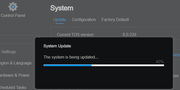
Image

2. If you refresh the browser, you will realise the NAS is off / down - that is not no case.
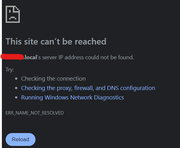
Image\

3. Probably the TOS was updated and you have a new TM name and IP. Use angry IP Scanner to identify the new IP, and access the control panel using an internet browser - using the new IP
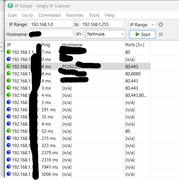
Image

4. You should be able to complete the setup (name and password for example).
5. In my case email validation did not work. Good point, there is a button to skip this.
6. Minor Typo here - TM team.
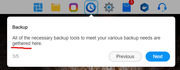
Image

7. Plex works, but you need to enable it through TOS - app centre
8. Just realised there is a new TOS version - accessible via control panel
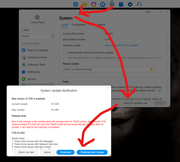
Image
User avatar
spamdz12o
Posts: 0
Joined: 17 Aug 2024, 02:35
Spain

Re: TOS 6.0.420 Beta Is Available for Testing

Post by spamdz12o »

spamdz12o wrote: 22 Aug 2024, 12:33
TMzethar wrote: 19 Aug 2024, 14:40
golgoth wrote: 19 Aug 2024, 13:22
Thank you for the additional information. You mentioned at least two other people experiencing issues consistent with what you presented, can you point us to any of the relevant threads?
There may be an unknown reason for the brief rise in CPU usage. We recommend that you continue communicating with your tech support email and schedule a remote troubleshooting appointment.
The error is really consistent. I have 3 disks. Whenever I copy to disk 1, I hit bad transfer speed and 100% CPU rate. Copying to any other disk raises the CPU abnormally, but not to 100%, (maybe 80).
Also, docker and Plex tend to hit 100 usage really easily, just trying to create a stack, where it needs to download the image loads the system so much that it says it failed but minutes after the container is there... MINUTES
Any info you need, ping me.
Just to update (thanks support guys) , after changing one disk (that had bad blocks, and that I thought should not impact *BUT INDEED DID*) and updating to the latest version on the docker app, everything works quite well (I dare not say awesome, but really well).

Now I can copy, move and do normal NAS stuff without killing the system. To update plex collections would kill the NAS for days, and now it can be done while configuring other docker things... and the CPU limit is working.

Only thing I noticed is downloading from the NAS (trying to bring all my cloud info to the NAS) is not as fast as it should... I have a 1000 mega download speed and struggle with more than 3 to 4 megas per second (on my laptop, I can hit 30 easily, and it is on wifi, not cable).

Any suggestion for a good download manager? Testing Aria2 in a dockerized environment...
User avatar
spamdz12o
Posts: 0
Joined: 17 Aug 2024, 02:35
Spain

Re: TOS 6.0.420 Beta Is Available for Testing

Post by spamdz12o »

koalakoala wrote: 18 Sep 2024, 10:19 Hi, just upgraded my TOS, a few comments

1. Update was stuck at 40%... that is not the case, is just a system update message.
Image

2. If you refresh the browser, you will realise the NAS is off / down - that is not no case.
Image\

3. Probably the TOS was updated and you have a new TM name and IP. Use angry IP Scanner to identify the new IP, and access the control panel using an internet browser - using the new IP
Image

4. You should be able to complete the setup (name and password for example).
5. In my case email validation did not work. Good point, there is a button to skip this.
6. Minor Typo here - TM team.
Image

7. Plex works, but you need to enable it through TOS - app centre
8. Just realised there is a new TOS version - accessible via control panel
Image
I normally prefer to have Plex dockerized. That way updates tend to come faster and you can limit resources better... just my 2 cents ;)
Post Reply

Return to “Update Notice”