[Discussion] New VMs version 1.0.051  [SOLVED]

Install virtual machines on your TNAS;
Post Reply
User avatar
polen
Posts: 16
Joined: 01 May 2026, 07:50
United States of America

[Discussion] New VMs version 1.0.051

Post by polen »

I just wanted to say thank you for continuing to update VMs application.

I updated with no problems.
  • Windows 11 Pro 25H2 worked with no issues.
  • Home Assistant on Linux worked with no issues.
I did not see any updates with usb-passthrough in the release notes so did not expect it to work for my Cygnal Integrated Products, Inc. HubZ Smart Home Controller USB device and it did not.
Hardware: F6-424 Max, 24GB RAM, 3 x 12TB WD Red Plus TRAID, 2 x NVMe 2TB TRAID, 2 x 500GB SD Ultra 3D RAID1 Quick Cache, 1 x 18TB WD USB3 Backup
Operating System: TOS 7.0.0791
Applications: Plex, VMs, Docker, USB Copy
User avatar
rfbjr
Silver Member
Posts: 426
Joined: 16 May 2024, 23:43
United States of America

Re: [Discussion] New VMs version 1.0.051

Post by rfbjr »

Only my F4-424 Pro has VMs installed, how long after you logon is the app icon in the taskbar suppose to indicate there is an update(s)?
Just curious, since I saw the post I knew there was one anyway.
F6-424 & F4-425 Plus at 7.0.1163
F4-424 Pro (x2) also at 7.0.1163
D4-320
User avatar
EriChan
TM Support
Posts: 310
Joined: 06 Jan 2026, 12:27
China

Re: [Discussion] New VMs version 1.0.051

Post by EriChan »

polen wrote: 26 Jun 2026, 10:35
Thank you for your proactive feedback! Your suggestions are very important to us. Our product team has received your input and is currently evaluating the USB passthrough functionality. We will prioritize improvements on this matter in our upcoming roadmap for future enhancements.
To contact our team, please send email to following addresses, remember to replace (at) with @

Technical team: support(at)terra-master.com(for technical support)
Service team: service(at)terra-master.com(for purchasing, return, replacement, RMA service)
User avatar
zeratyx
Posts: 7
Joined: 22 Jul 2026, 04:25
France

Re: [Discussion] New VMs version 1.0.051  [SOLVED]

Post by zeratyx »

Hello,
I'm trying to install Home Assistant on TOS 7 with VMs (version 1.0.055) but it's not working. How do I do it ?
User avatar
MikeZhang
TM Support
Posts: 416
Joined: 05 Sep 2023, 22:21

Re: [Discussion] New VMs version 1.0.051

Post by MikeZhang »

zeratyx wrote: 25 Jul 2026, 20:46
The entire process consists of three main steps, with the configuration of the virtual machine's network being the most critical.

Download the HAOS disk image: First, download the disk image file suitable for virtual machines (usually in .qcow2 or .vmdk format) from the official Home Assistant website.

Create a virtual machine in TOS 7:
Log in to the TOS 7 system and open the VMs (Virtual Machines) app.
Click "Add VM" to create a new virtual machine.
When configuring the settings, select "Linux" as the Operating System (OS) type.
Allocate resources: It is recommended to allocate at least 2GB of RAM and 2 virtual CPU cores to ensure Home Assistant runs smoothly.
Disk: For the "Primary vDisk Location," select "Manual" and upload or specify the HAOS image file you downloaded earlier.

Key Step: Configure the virtual machine network:
This is the most critical step; incorrect configuration will prevent the virtual machine from accessing the network.
In the virtual machine's network settings, select "br0" (or a similar bridge mode option) for the "Network Source." This allows the virtual machine to connect directly to your LAN—just like other devices in your home—and obtain its own independent IP address.

Select "virtio" for the "Network Model."

Once these settings are complete, you can start the virtual machine. Wait for it to finish booting up (this may take a few minutes), then access the Home Assistant initialization interface via your browser at `http://homeassistant.local:8123` or by using the IP address displayed on the virtual machine's startup screen.
To contact our team, please send email to following addresses, remember to replace (at) with @

Technical team: support(at)terra-master.com(for technical support)
Service team: service(at)terra-master.com(for purchasing, return, replacement, RMA service)
User avatar
zeratyx
Posts: 7
Joined: 22 Jul 2026, 04:25
France

Re: [Discussion] New VMs version 1.0.051

Post by zeratyx »

Thank you for your reply. It works fine at first, but after configuring the disk and network settings, it doesn't match. Here's the screen with no options available.


Image
User avatar
zeratyx
Posts: 7
Joined: 22 Jul 2026, 04:25
France

Re: [Discussion] New VMs version 1.0.051

Post by zeratyx »

Thank you, I finally succeeded.
User avatar
angelor
Posts: 3
Joined: 22 Jun 2026, 16:15
Italy

Re: [Discussion] New VMs version 1.0.051

Post by angelor »

MikeZhang wrote: 26 Jul 2026, 00:31
Hi,
i'm trying to install HA OS using the new TOS7-VMs.
As you know the Home Assistant does not provide the iso file as VMs needed to install the virtual machine.
I tryed different ways to "convert" the HA .vdi or .qcow2 to iso but without success (different problems and also the iso created was not bootable...etc etc).
can you help please to install HA? or to convert the file to ISO bootable?
Many thanks in advance. Bye.
Angelo
User avatar
EriChan
TM Support
Posts: 310
Joined: 06 Jan 2026, 12:27
China

Re: [Discussion] New VMs version 1.0.051

Post by EriChan »

angelor wrote: 27 Jul 2026, 21:57
You cannot convert HAOS (.qcow2 or .vdi) into a bootable ISO because Home Assistant OS is a pre-installed disk image containing UEFI partitions, not an installation installer.

Here is the tested procedure to install HAOS in TOS 7 VMs:

1. Download & Extract: Download the official KVM/QEMU (.qcow2.xz) image from the Home Assistant website and extract the .qcow2 file.
2. Open VMs App: Launch the VMs application in TOS 7.
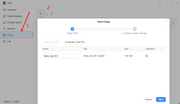
3. Import Image: Go to the Image module in VMs and import the extracted .qcow2 file.
Image
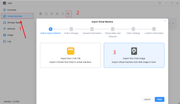
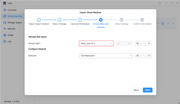
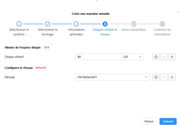
4. Import VM: Switch to the Virtual Machine tab, click Import, select "Import from disk image" , choose your .qcow2 file, and complete the VM setup.
Image
Image
Image
Image

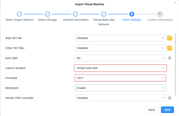
Crucial Configuration Settings:
  • Boot Mode (UEFI): In the VM firmware/boot settings, ensure the boot mode is set to UEFI (HAOS will not boot under Legacy BIOS).
  • Boot Device: Make sure Virtual Disk is selected as the boot location.
  • Resources: Assign at least 2 vCPUs and 2GB RAM, then power on the VM. It will boot straight into HAOS.
Hope this helps!
To contact our team, please send email to following addresses, remember to replace (at) with @

Technical team: support(at)terra-master.com(for technical support)
Service team: service(at)terra-master.com(for purchasing, return, replacement, RMA service)
User avatar
angelor
Posts: 3
Joined: 22 Jun 2026, 16:15
Italy

Re: [Discussion] New VMs version 1.0.051

Post by angelor »

Many Thanks EriChan, it works!!!!
Bye
Post Reply

Return to “Virtual Machines”