Selecting Photos [Accepted]


Selecting Photos
I gave the Photo app a try but before posting my adventure/observations, when you filter photos, say all for 2025, is there a simple way to select all of them (in my case hundreds) to add them into an Album?
F4-424 Pro (x2) and F4-425 Plus at 7.0.1536
F6-424 Plus at 7.1ß
D4-320 & D4-SSD
F6-424 Plus at 7.1ß
D4-320 & D4-SSD


Re: Selecting Photos
Currently, the Photos app does not support a one-click "Select All" feature.
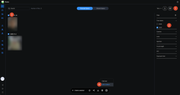
You can refer to the steps shown in the screenshot below to filter and batch-select photos by date group:
1. Click the Filter icon in the upper-right corner.
2. Under Time taken in the filter panel, select the target year (e.g., 2025).
3. Click the selection circle next to each date header to select all photos taken on that day in batches.
4. On the bottom action bar, click ... and select Add to album.
If you have any suggestions or ideas on how we can improve photo management, please feel free to share them with us. We truly appreciate your feedback!
To contact our team, please send email to following addresses, remember to replace (at) with @
Technical team: support(at)terra-master.com(for technical support)
Service team: service(at)terra-master.com(for purchasing, return, replacement, RMA service)
Technical team: support(at)terra-master.com(for technical support)
Service team: service(at)terra-master.com(for purchasing, return, replacement, RMA service)
Re: Selecting Photos [Accepted]
The problem is step #3, when the thumbnails can go for pages. Can you click the top month/file and then somehow scroll down and click the last one?
Like file manager, click the top one, scroll to bottom, hold the shift key and click the last one.
Granted this is only an issue importing for the very first time, which is a big annoyance.
Another way, give an option to not show thumbnails, but file names, basically an easier way to select them all.
F4-424 Pro (x2) and F4-425 Plus at 7.0.1536
F6-424 Plus at 7.1ß
D4-320 & D4-SSD
F6-424 Plus at 7.1ß
D4-320 & D4-SSD
Re: Selecting Photos
Good news! This feature has already been implemented.
In the upcoming release, you will be able to use Shift-click batch selection just like in File Manager: simply click the first photo, hold down the Shift key, and click the last photo to select all photos in between.
This feature will be rolled out in the next version update. Thank you for your valuable feedback and patience!
To contact our team, please send email to following addresses, remember to replace (at) with @
Technical team: support(at)terra-master.com(for technical support)
Service team: service(at)terra-master.com(for purchasing, return, replacement, RMA service)
Technical team: support(at)terra-master.com(for technical support)
Service team: service(at)terra-master.com(for purchasing, return, replacement, RMA service)
Re: Selecting Photos
Thanks!
F4-424 Pro (x2) and F4-425 Plus at 7.0.1536
F6-424 Plus at 7.1ß
D4-320 & D4-SSD
F6-424 Plus at 7.1ß
D4-320 & D4-SSD