Selecting Photos


Selecting Photos
I gave the Photo app a try but before posting my adventure/observations, when you filter photos, say all for 2025, is there a simple way to select all of them (in my case hundreds) to add them into an Album?
F4-424 Pro (x2) and F4-425 Plus at 7.0.1422
F6-424 at 7.0.1422 as well
D4-320
F6-424 at 7.0.1422 as well
D4-320


Re: Selecting Photos
Currently, the Photos app does not support a one-click "Select All" feature.
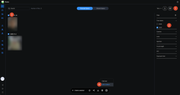
You can refer to the steps shown in the screenshot below to filter and batch-select photos by date group:
1. Click the Filter icon in the upper-right corner.
2. Under Time taken in the filter panel, select the target year (e.g., 2025).
3. Click the selection circle next to each date header to select all photos taken on that day in batches.
4. On the bottom action bar, click ... and select Add to album.
If you have any suggestions or ideas on how we can improve photo management, please feel free to share them with us. We truly appreciate your feedback!
To contact our team, please send email to following addresses, remember to replace (at) with @
Technical team: support(at)terra-master.com(for technical support)
Service team: service(at)terra-master.com(for purchasing, return, replacement, RMA service)
Technical team: support(at)terra-master.com(for technical support)
Service team: service(at)terra-master.com(for purchasing, return, replacement, RMA service)