[Help] D5-300 Problem with Seagate NAS drives not initialising  [SOLVED]

USB RAID storage for photographers, music producers, movie collectors
Post Reply
User avatar
GOODCHAPJOSH
Posts: 3
Joined: 01 Nov 2025, 19:19
Ireland

[Help] D5-300 Problem with Seagate NAS drives not initialising

Post by GOODCHAPJOSH »

Hello,

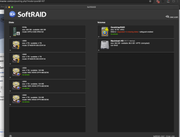
I am having an issue with my Terrasmaster D5-300 and a Seagate ST4000VN006-3CW104 4tb Ironwolf drive. I have ran analysis on the drives and they are healthy but they will not initialise on startup. I did some troubleshooting online and people seem to point to the fact that the Seagate drives have a PUIS feature which means the software doesnt immediately recognise them. Is there any software update that could help with so the drives boot up normally. I am using a mac mini to access the terramaster.
Image
User avatar
TMjack
TM Support
Posts: 185
Joined: 27 Oct 2020, 08:41

Re: [Help] D5-300 Problem with Seagate NAS drives not initialising

Post by TMjack »

Hello, the screenshot shows that two hard disks in the D5-300's RAID5 array have abnormal status, causing the MAC computer to fail reading data. Please try shutting down the device, then reinstall all hard disks in the correct order, and check if the array can recover.
To contact our team, please send email to following addresses, remember to replace (at) with @
Technical team: support(at)terra-master.com (for technical support)
Service team: service(at)terra-master.com (for purchasing, return, replacement, RMA service)
User avatar
GOODCHAPJOSH
Posts: 3
Joined: 01 Nov 2025, 19:19
Ireland

Re: [Help] D5-300 Problem with Seagate NAS drives not initialising

Post by GOODCHAPJOSH »

Thanks for your response TMjack, unfortunately this does not fix the problem. is there any merit to this theory? and any solution based on that? or any other idea on how to get Softraid to recognise them as they are healthy?
Seagate drives have a PUIS feature which means the software doesnt immediately recognise them. Is there any software update that could help with so the drives boot up normally. I am using a mac mini to access the terramaster.
User avatar
TMjack
TM Support
Posts: 185
Joined: 27 Oct 2020, 08:41

Re: [Help] D5-300 Problem with Seagate NAS drives not initialising

Post by TMjack »

If your hard drive has the PUIS (Power-Up in Standby) feature enabled, the D5-300 device may fail to fully recognize the drive during power-on. In this case, you need to use the official Seagate-provided tool (such as SeaChest Utilities) to disable the hard drive's PUIS feature in order to restore its normal functionality. If the issue persists, replacing the hard drive may be the only recourse.
To contact our team, please send email to following addresses, remember to replace (at) with @
Technical team: support(at)terra-master.com (for technical support)
Service team: service(at)terra-master.com (for purchasing, return, replacement, RMA service)
User avatar
CursaYang
TM Support
Posts: 740
Joined: 06 Jan 2025, 16:34
China

Re: [Help] D5-300 Problem with Seagate NAS drives not initialising

Post by CursaYang »

Our D5-300 itself supports the hard disk smart sleep function, so there is no need to enable the PUIS (Power-up in Standby) function again.
To contact our team, please send email to following addresses, remember to replace (at) with @

Technical team: support(at)terra-master.com(for technical support)
Service team: service(at)terra-master.com(for purchasing, return, replacement, RMA service)
User avatar
GOODCHAPJOSH
Posts: 3
Joined: 01 Nov 2025, 19:19
Ireland

Re: [Help] D5-300 Problem with Seagate NAS drives not initialising

Post by GOODCHAPJOSH »

is there firmware for the terramaster d5-300? I cannot find it anywhere
User avatar
CursaYang
TM Support
Posts: 740
Joined: 06 Jan 2025, 16:34
China

Re: [Help] D5-300 Problem with Seagate NAS drives not initialising

Post by CursaYang »

The previous reply was an automatic response from an advertising robot. There is no universal firmware update for the D5-300. Are you experiencing the same issue as before? Have you tried disabling the PUIS function?
To contact our team, please send email to following addresses, remember to replace (at) with @

Technical team: support(at)terra-master.com(for technical support)
Service team: service(at)terra-master.com(for purchasing, return, replacement, RMA service)
Post Reply

Return to “USB Series”