

Hello,
I would like to add an SSD to my F4-423 and install TOS on it. At the moment, my system is running with 4 HDDs, and TOS is currently installed on them.
My goal is to migrate TOS to the new SSD without losing any of the data stored on the HDDs. The advantage would be that the HDDs could go into standby more often, while the SSD handles the system operations.
Is this migration possible, and if so, what would be the correct procedure?
Thank you in advance for your help!
Add SSD and migrate TOS from HDD [SOLVED]

Re: Add SSD and migrate TOS from HDD
Hello, starting from TOS version 6.0.750 and subsequent versions, the system has introduced a system disk migration feature. With this feature, you can migrate the system from an HDD to an SSD. For specific steps, please refer to the detailed instructions in the TOS 6 help documentation. Additionally, please ensure that your TOS system version is TOS 6.0.750 or later.
To contact our team, please send email to following addresses, remember to replace (at) with @
Technical team: support(at)terra-master.com (for technical support)
Service team: service(at)terra-master.com (for purchasing, return, replacement, RMA service)
Technical team: support(at)terra-master.com (for technical support)
Service team: service(at)terra-master.com (for purchasing, return, replacement, RMA service)


Re: Add SSD and migrate TOS from HDD [SOLVED]
Hello!ajkaramba wrote: ↑05 Oct 2025, 00:18 Hello,
I would like to add an SSD to my F4-423 and install TOS on it. At the moment, my system is running with 4 HDDs, and TOS is currently installed on them.
My goal is to migrate TOS to the new SSD without losing any of the data stored on the HDDs. The advantage would be that the HDDs could go into standby more often, while the SSD handles the system operations.
Is this migration possible, and if so, what would be the correct procedure?
Thank you in advance for your help!
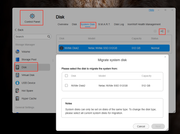
Thank you for your interest. Our latest TOS 6.0.783 system now officially supports system disk migration functionality.
You can directly access this feature through the following path:
Control Panel > Disk > System Disk > Migrate
Within this interface, simply select your new SSD as the target disk to complete the system migration effortlessly. This feature is designed to help you seamlessly transfer your system to a higher-performance drive, thereby enhancing system responsiveness and optimizing storage efficiency.
If you have any questions during the operation, please feel free to consult us.
To contact our team, please send email to following addresses, remember to replace (at) with @:
Technical team: support(at)terra-master.com(for technical support)
Service team: service(at)terra-master.com(for purchasing, return, replacement, RMA service)
Technical team: support(at)terra-master.com(for technical support)
Service team: service(at)terra-master.com(for purchasing, return, replacement, RMA service)
Re: Add SSD and migrate TOS from HDD
That worked, thanks!
Is it also possible to move installed Apps (Jellyfin, Docker Engine and Docker Manager) to the new SSD?
With SSH I can see that it is still installed under Volume1:
ls -lah /usr/local/jellyfin
/usr/local/jellyfin -> /Volume1/@apps/jellyfin
Is it also possible to move installed Apps (Jellyfin, Docker Engine and Docker Manager) to the new SSD?
With SSH I can see that it is still installed under Volume1:
ls -lah /usr/local/jellyfin
/usr/local/jellyfin -> /Volume1/@apps/jellyfin

Re: Add SSD and migrate TOS from HDD
Currently, only the system disk is supported for migration, and installed applications cannot be migrated directly. You can choose a new SSD when installing applications.


Re: Add SSD and migrate TOS from HDD
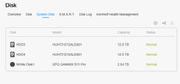
Sorry to hijack but after I migrated, I still have two HDD showing in the system disk. Do I delete those two HDD from the section?