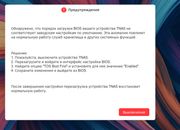
Model: F4-424
TOS Version:
* Previously: TOS 7.0.0747 (worked normally)
* Current: TOS 7.0.0765
BIOS Version:
* Originally V06
* Updated to **MADN0101.V08** (issue persists)
Storage Configuration:
* 1× NVMe SSD 500 GB (system drive)
* 2× 4 TB Seagate IronWolf HDDs configured as RAID 1
Issue:
After updating from TOS 7.0.0747 to 7.0.0765, I started experiencing problems when accessing the NAS through the web interface. The system worked perfectly before the update, and I did not notice any issues prior to upgrading.
The problem appeared immediately after installing TOS 7.0.0765 and has persisted ever since.
Interestingly, the issue only affects the web interface. The mobile application connects and works normally, and SMB file sharing also functions without any problems. The NAS itself appears to be operating normally, and all data is accessible over SMB.
I initially suspected the BIOS because the system was still running BIOS V06, so I upgraded it to MADN0101.V08, but this made no difference.
I also contacted TerraMaster support and tried every solution they suggested, but none resolved the issue.
Steps already taken:
* Updated BIOS from V06 to MADN0101.V08
* Removed the internal USB device from the motherboard as instructed by support
* Disabled the corresponding BIOS option (boot-related flag) and manually configured the boot priority
* Repeated multiple reboots after each change
None of these steps fixed the problem.
Interesting observation:
If I disconnect both HDDs, leaving only the NVMe system SSD installed, the NAS works normally and the web interface is accessible without any issues.
As soon as the RAID 1 HDDs are connected again, after reboot the problem returns.
Question:
Has anyone experienced a similar issue after updating to TOS 7.0.0765? Is there anything else I can try to diagnose or fix this issue? Any suggestions would be greatly appreciated.