Page 1 of 1
[Help] Cloud Sync can't select local directories [SOLVED]
Posted: 29 Mar 2026, 18:53
by renob
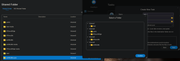
I am not able to select many shared folders for the local directory in a Cloud Sync task.
What can prevent selecting a folder? Even folders with the exact same user and user group permissions as the visible folders can't be selected.
F4-425 Plus
TOS 6.0.794-01324
Re: [Help] Cloud Sync can't select local directories
Posted: 29 Mar 2026, 19:03
by Gremlin
Application permission.
Re: [Help] Cloud Sync can't select local directories
Posted: 30 Mar 2026, 12:16
by OrionXie
renob wrote: ↑29 Mar 2026, 18:53
We have the following suggestions for your confirmation:
1. Does the shared folder list display correctly in file manager?
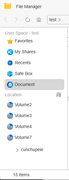
2. We suggest you try changing the folder name. For example, change the part before the '-' in '970evo500gb-media' (i.e., '970evo500gb') to a different letter combination. This issue is likely caused by a conflict or problem due to the same first part of the folder name. Please observe whether the problem is improved after making the change.
Re: [Help] Cloud Sync can't select local directories
Posted: 31 Mar 2026, 18:08
by renob
1. Yes all shared folders display in file manager
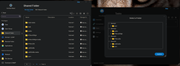
2. I renamed "sn850x8tb-sync" to "sync" and now it is available
Questions:
1. What is causing this behavior?
2. What characters would cause this "delimiter" issue?
3. If it's not a "delimiter" issue then how many characters of the beginning of a folder name could be the same before there is a problem?
Re: [Help] Cloud Sync can't select local directories
Posted: 01 Apr 2026, 11:11
by EriChan
Thanks for your follow-up feedback.
We have confirmed that this issue does exist and occurs whenever the file names share the same substring at the beginning. This is considered an application defect.
The issue has been reported to our product team, and we will evaluate and optimize it in future updates. Thank you for your patience and understanding.
Re: [Help] Cloud Sync can't select local directories
Posted: 13 Jul 2026, 07:13
by renob
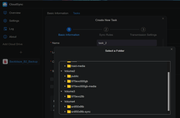
This appears to be resolved in TOS 7.
Re: [Help] Cloud Sync can't select local directories
Posted: 13 Jul 2026, 16:40
by Felix
Thank you for the update.
We are glad to hear that this issue has been resolved in TOS 7. We appreciate your feedback and sharing your experience with the community.
If you encounter any other issues while using TOS, please feel free to let us know. Thank you again for your support.