Page 1 of 1
Latest Test v465
Posted: 25 Mar 2026, 06:59
by rfbjr
First RSYNC itself is working fine, even creating a recurring task. The job does copy the data, no issues.
Now..
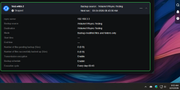
This screen shot (I included my computer time as well) I created a currenting task at 9:35am to run every day at 9:45am.
Why does it show on top next occurrence at 8:30am? My guess part of the program is still using standard time, not DST.
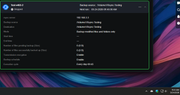
Hard to tell but it actually did run (data was copied) at 9:30am. The next occurrence stamp did get updated (granted an hour behind)
No start/stop info displayed or start/stop notifications/emails.
It ran again at 10:30am.
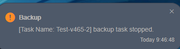
The last interesting part is when I stopped the recurring, a notification and email is generated for that.
Re: Latest Test v465
Posted: 25 Mar 2026, 16:50
by Phil
In order to more accurately identify your issue: Please provide the following information:
1. Control Panel - General Settings - Time Synchronization Interface .We need to check if there is any error in your time synchronization;
2. Rsync Task Editing and Viewing. We need to know your task execution schedule.
Re: Latest Test v465
Posted: 25 Mar 2026, 18:39
by rfbjr
Note: I turned off the recurring after two occurrences yesterday.
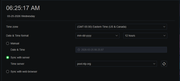
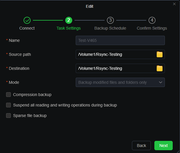
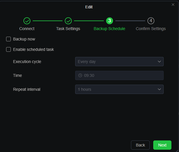
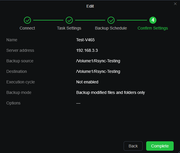
Not sure what you are looking for in the details of the recuring task. There isn't a setting for notification.
It does work, just no notifications and part of the time display is off.
Besides if there were something wrong with the time sync, I think the USBCopy, Snapshot jobs all would display wrong dates, they don't.
Remember, a simple non-recurring task does display the end time, number of files and notification/email of start/stop. Issue is only with recurring.
Re: Latest Test v465
Posted: 26 Mar 2026, 15:48
by Phil
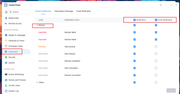
Thank you for your feedback. I apologize that my previous explanation was not very clear. Your Rsync task notifications can be configured in Control Center -- General Settings -- Notifications. Please refer to this image for notification settings.
Re: Latest Test v465
Posted: 26 Mar 2026, 19:02
by rfbjr
They are on, always have been.
The issue only happens when running a recurring rsync job.
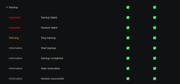
It can be that there is a bug, not user error. This still is a beta cycle.
Re: Latest Test v465
Posted: 27 Mar 2026, 15:46
by Phil
rfbjr wrote: ↑26 Mar 2026, 19:02
They are on, always have been.
The issue only happens when running a recurring rsync job.
It can be that there is a bug, not user error. This still is a beta cycle.
Thank you for your patience and continued feedback. The TOS system is currently in the testing phase, precisely to identify and fix such issues. I have submitted your detailed case to the team for specific reproduction and verification. If it is confirmed as a bug, the fix will be released in a subsequent system update.
We sincerely apologize for any inconvenience this may cause. Your feedback is crucial to product improvement. Please pay attention to subsequent version update logs.
Re: Latest Test v465
Posted: 27 Mar 2026, 18:06
by rfbjr
Thank you