Page 1 of 1
[Help] How to utilize the full system disk (how to run containers off the system disk)
Posted: 02 Mar 2026, 05:01
by How2UpdateDocker
Hello,
I run docker containers on my TOS 6 and preferabbly i want to run them off the NVME SSD where i also have the system partition on.

I noticed in jellyfin that i only have 7GB after moving my volumes to the /homes/ directory, and the other path's reported the size of the storage volume (all HDD's, ussually slow and busy).
Is it possible (with the CLI that's also fine, or using TOS 7) to run my containers off the system nvme ssd and utilize the full disk?
I really like TOS as configuring a RAID 0 with 2, 4 and 10TB disks is done nicely with a Write+Read SSD cache is super easy! But to keep my containers from being slowed down seems to be challanging (unless i overlooked something)!
Re: [Help] How to utilize the full system disk (how to run containers off the system disk)
Posted: 02 Mar 2026, 17:15
by MikeZhang
You can install the Docker engine on an SSD volume. When deploying the Jellyfin container, configure the volume mounts to include the directory where your media files are stored. Additionally, other system storage can be allocated to the SSD to improve performance.
Re: [Help] How to utilize the full system disk (how to run containers off the system disk)
Posted: 02 Mar 2026, 20:42
by How2UpdateDocker
MikeZhang wrote: ↑02 Mar 2026, 17:15
You can install the Docker engine on an SSD volume. When deploying the Jellyfin container, configure the volume mounts to include the directory where your media files are stored. Additionally, other system storage can be allocated to the SSD to improve performance.
Ok, but how do i get the extra space that isn't used now on the system disk?
And how can i install an application in a way that it will be installed to the system disk, to run off from?
Re: [Help] How to utilize the full system disk (how to run containers off the system disk)
Posted: 02 Mar 2026, 23:22
by Gremlin
When I set up TOS (on an nvme capable device) I install TOS with just the nvme(s) intended as system drive connected (being a single device or array). I create a Storage Pool on the remaining space of the nvme drive/array. Being an initial install this will be SP1; then I create a single volume (Vol1) on that SP1. This install will have the user default 'home' folders if you choose to enable them (they are by default) and you can choose to install your APPs on Vol1 also so that all of that is on the nvme drive/array. If subsequent drives (particularly HDD) are installed these can be arranged for your data storage. The arrangement allows apps/system that need (basically) continuous access to run on system drive and HDD can sleep until required. Probably not perfect, but it works for me.
If you end up with an nvme as system with nothing else on it, you should be able to simply create a new storage pool/Volume on it but you will still end up with "stuff in the wrong place".
I was rather confused by your comment about 'after moving my volumes to the /homes/ directory'. Volumes should not be living in the "/homes/" directory. Volumes live on Storage Pools. "/homes" is a specific folder under a Volume (typically Vol1) and tends to be restricted in it's use to protect individual named users' data. i.e from outside the nas (smb etc) only the named user should have access to their "home folder". If multiple users require access, then use shared folders.
Re: [Help] How to utilize the full system disk (how to run containers off the system disk)
Posted: 03 Mar 2026, 00:24
by How2UpdateDocker
Hey Gremlin!
I see, so i needed to create a new storage volume on the system disk, so i can run/install applications on that volume?
I'm a bit hesitant to run the following, to not remove all my system data:
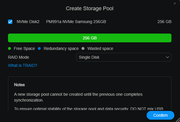

But i can run this, and it will not oblibrate the OS? I can then try and see if i can reinstall the docker engine (or as a test a different application).
Re: [Help] How to utilize the full system disk (how to run containers off the system disk)
Posted: 03 Mar 2026, 16:23
by MikeZhang
This operation will not affect the system data partitions. You can safely create storage pools and use them for data storage to ensure efficient and secure data management.