Page 1 of 3
[Help] Filesystem Snapshot
Posted: 20 Feb 2026, 01:43
by rfbjr
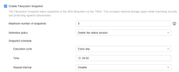
On my F4-425 Plus the Filesystem snapshot has run for a few days.
Is there a log somewhere I can look at?
Granted that NAS had a raid resync running for the past two days. So that could be part of it, for now I just disabled then reenabled it. It should run at 9am each day.
I could just change the schedule to run later today and see what happens.
Re: [Help] Filesystem Snapshot
Posted: 20 Feb 2026, 11:54
by TMzethar
Hi, are you trying to say that the scheduled automatic snapshot at 9 AM every day isn't working?
There are no viewable logs related to this.
Re: [Help] Filesystem Snapshot
Posted: 20 Feb 2026, 19:11
by rfbjr
It was then it stopped. I honestly did not look at the snapshot list until yesterday. I did disable and reenable, so I'll look in 3 hours to see if it started up again.
Re: [Help] Filesystem Snapshot
Posted: 20 Feb 2026, 23:06
by rfbjr
Ok it didn't run at 9am (local time)
I was thinking maybe something to do with these old snapshots.
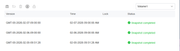
I deleted them and changed the schedule to run at 10am. It worked fine. Go figure. Changed it back to 9am and let's see what happens tomorrow.
Re: [Help] Filesystem Snapshot
Posted: 21 Feb 2026, 06:32
by Gremlin
Just looked at my F2-424 running TOS7.0.0403 and it looks like my snapshots have not run since late January (set to run weekly, on Wednesdays). I usually only keep 2 or 3 snapshots just for basic. Likewise I have cleared out old sets. NOW SET TO RUN DAILY. Will see what happens. (My other TOS7 device only has Ext4 file systems.)
Re: [Help] Filesystem Snapshot
Posted: 21 Feb 2026, 09:25
by GevinKe
rfbjr wrote: ↑20 Feb 2026, 23:06
Thank you for your feedback. We will share this information with our laboratory for further verification and to pinpoint the root cause of the issue.
Re: [Help] Filesystem Snapshot
Posted: 22 Feb 2026, 02:07
by rfbjr
rfbjr wrote: ↑20 Feb 2026, 23:06
Ok it didn't run at 9am (local time)
I was thinking maybe something to do with these old snapshots.
I deleted them and changed the schedule to run at 10am. It worked fine. Go figure. Changed it back to 9am and let's see what happens tomorrow.
Just remembered to check, yes, the Filesystem Snapshot ran today. Since for the moment I have it run every day, the Monday morning run should purge out the oldest. Just to see if there is a pattern.
Re: [Help] Filesystem Snapshot
Posted: 22 Feb 2026, 06:39
by Gremlin
Yes, my snapshots also ran today. Waiting to see ..........

Cleanup issue from TOS6 > TOS7 update
I notice Filesystem Snapshot lists 4 versions of lists on Volume 1 (FS1 --> FS4); these existed previously, but only FS4 is utilised now. Volume 2 does not have versions.
Re: [Help] Filesystem Snapshot
Posted: 27 Feb 2026, 19:36
by rfbjr
I just checked the 2 NAS that have Filesystem Snapshots and they both last ran on Feb 22nd. We lost power later that day and all my units were off for a day or so. So maybe if the unit is powered off, the job forgets the schedule? Maybe even reboot as well? Not sure.
Re: [Help] Filesystem Snapshot
Posted: 27 Feb 2026, 22:16
by rfbjr
More fun facts, neither created a snapshot at the scheduled time. Even running manually. What I did this time was just delete the oldest of the 3 snapshots (number to keep is 3) and then run manually, it worked. So tomorrow I'll see if runs as scheduled and delete the next oldest.