Page 1 of 1
[Help] Plex won't open in browser after installation
Posted: 15 Feb 2026, 08:32
by Lpobuyer
I just installed Plex on my F4-424 and when i click the icon, it opens a browser window but never connects (times out).
Tired different IP address combinations to see if it had the wrong one, with no luck.
I uninstalled and reinstalled the app, rebooted the NAS, check my router and set the IP address and port forwarding to my NAS and 32400, base on what it shows in the control panel.
Anyone has any ideas what I could try to fix this?
The TOS opens no problem and i also use Transmission and it opens in its own browser window no problem.
Thanks,
Re: [Help] Plex won't open in browser after installation
Posted: 15 Feb 2026, 15:32
by OrionXie
Hello, regarding your issue, we have the following suggestions and steps you can try:
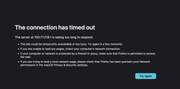
1. What message do you get when you open Plex? Please provide a screenshot;
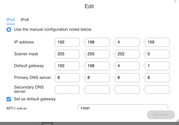
2. Is your TNAS network set to manual or automatic IP address acquisition?
If the network is automatic, try setting it to manual and setting the DNS to 8.8.8.8, then try again;
Does downloading a new application allow it to open normally?
3. Check for application port conflicts.
Are there other applications conflicting with port 32400, causing Plex to fail to log in?
Re: [Help] Plex won't open in browser after installation
Posted: 15 Feb 2026, 23:19
by Lpobuyer
Hi,
Thanks for answering back.
Here is a screenshot of the message I get:
TOS is set to manual, with IP address as such:
Plex is set on port 32400 and no other apps are listed with the same port, i have a reservation in my router for the default ip address with a port forwarding for the plex port.
I downloaded the latest Plex installation file and installed it manually, same result.
Thanks,
Re: [Help] Plex won't open in browser after installation
Posted: 16 Feb 2026, 09:14
by TMjack
I would like to confirm with you: Based on the information you've provided, it seems you are currently accessing the Plex service remotely over the internet. Have you tried accessing Plex within your local network environment? If local access works fine, the issue is likely still related to the network port forwarding settings.
Re: [Help] Plex won't open in browser after installation
Posted: 16 Feb 2026, 11:23
by Lpobuyer
I am using my laptop and my home wifi to login to the TOS through my web browser. From there i open Plex from the app icon, i also have it as a bookmark in my browser.
For some reason, Plex worked for a few hours and now it''s not again, don't know why, I haven't changed anything,
The TOS was also not available under the 192.168.4.248 and is now available using 100.77.218.1. Don't know why, the TNAS PC show it under 192.168.4.248.
Re: [Help] Plex won't open in browser after installation
Posted: 19 Feb 2026, 15:38
by CursaYang
100.77.218.1 is the virtual IP used by tnas online, and 192.168.4.248 is the local network NAS IP. You should typically be able to access Plex by using this IP address with the port. Please confirm that the IP in the address bar is correctly redirected.