Page 1 of 2
Qbittorrent official release crashes very often in TOS7
Posted: 31 Jan 2026, 15:43
by erhard2009
Hi, After nearly 3 weeks of use, I noticed Qbittorrent 5.1.4.1 official release stops working and crashes very often. Also it generates a process with strange and random name that uses almost 100% of the processor. I have the latest TOS7 beta version 7.0.0398. Looking forward to a solution. Thank you.

Re: Qbittorrent official release crashes very often in TOS7
Posted: 31 Jan 2026, 16:30
by TMLila
Hello! Thank you for contacting TerraMaster. I have forwarded your issue to our project team for dedicated verification. We will keep you updated as soon as we have the verification result. Thank you for your patience.
Re: Qbittorrent official release crashes very often in TOS7
Posted: 04 Feb 2026, 01:55
by erhard2009
Hi, I was about to raise another report with Jellyfin also use up the entire processor but after update to the latest TOS 7.0.0403, I noticed the issue is solved. Qbittorrent, Jellyfin and the other apps are working fine now. So, most likely an OS issue ?
Re: Qbittorrent official release crashes very often in TOS7
Posted: 04 Feb 2026, 14:36
by CursaYang
Hello, after you upgrade to 7.0.0403, does that strange process still exist? This could be a malicious program downloaded, with typical naming characteristics being random, meaningless alphanumeric combinations.
Re: Qbittorrent official release crashes very often in TOS7
Posted: 05 Feb 2026, 00:15
by erhard2009
CursaYang wrote: ↑04 Feb 2026, 14:36
Hello, after you upgrade to 7.0.0403, does that strange process still exist? This could be a malicious program downloaded, with typical naming characteristics being random, meaningless alphanumeric combinations.
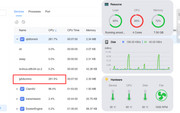
Yes, sorry I notice today that Qbittorrent crashed again even after the update to 7.0.0403. I thought it was solved but the issue came back again. The process with the strange name is genrated under the Qbittorrent service.

How is it possible that a resource like CPU is used more than 100% like in the image above ?
Re: Qbittorrent official release crashes very often in TOS7
Posted: 05 Feb 2026, 05:59
by TMzethar
Under normal circumstances, even if multiple seed tasks are running simultaneously, the CPU usage would not be this high. It is possible that the virus in the files downloaded through Qbittorrent is causing this issue.
Try a simple solution:
You can use the command to find its PID, then attempt to locate the directory of the potential virus file.
Delete the file and kill the process.
It is recommended that you install ClamAV again and scan it.
Re: Qbittorrent official release crashes very often in TOS7 [Accepted]
Posted: 05 Feb 2026, 17:34
by Gremlin
erhard2009 wrote: ↑05 Feb 2026, 00:15
How is it possible that a resource like CPU is used more than 100% like in the image above ?
100% is 1 core fully utilised, 200% is 2 cores fully utilised, etc, etc depending on number of cpu cores available.
Re: Qbittorrent official release crashes very often in TOS7
Posted: 06 Feb 2026, 00:44
by erhard2009
Hi, I scanned the NAS with Clam AV and SMB shares with Windows Defender, no virus reported. I used ps- ef in terminal to reveal the PID and PPID.
Looks like the
PPID of the strange process "jphAcmmo" is 1 /sbin/init.


Re: Qbittorrent official release crashes very often in TOS7
Posted: 06 Feb 2026, 06:32
by TMzethar
Please check here and you might be able to find the location of the virus file.
Re: Qbittorrent official release crashes very often in TOS7
Posted: 06 Feb 2026, 15:48
by erhard2009
TMzethar wrote: ↑06 Feb 2026, 06:32
Please check here and you might be able to find the location of the virus file.
Looks like the working folder is /tmp . But it also appears "deleted". When I list the /tmp folder it's not there.
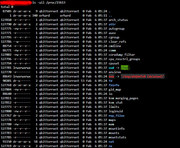
This is only happening when I add a new torrent to Qbittorrent. In a few seconds the CPU is loaded fully, Qbittorrent page is not accessible anymore and it shows "Bad Gateway" message. All other apps are working fine but they get slowed down due to the high CPU usage of Qbittorrent. If I kill the random name process, and restart the NAS, Qbittorrent resumes working fine and the download is carried out normally.
It doesn't look like a virus to me - I scanned the NAS twice - but more like a bug in Qbittorrent or some incompatibility with the OS.