Page 1 of 1
[Discussion] File Manager default location
Posted: 13 Jan 2026, 00:42
by rfbjr
Is it possible to configure the default location when launching file manager to /Volume1 and not the home directory of the user? Can you just create a short cut to /Volume1 on the desktop?
Re: [Discussion] File Manager default location
Posted: 14 Jan 2026, 02:06
by rfbjr
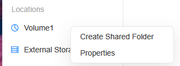
To create a desktop shortcut to a volume in TerraMaster, follow these steps:
Select the Volume: Open the TerraMaster file manager and navigate to the volume you want to create a shortcut for.
Right-Click: Right-click on the volume and choose the option to create a shortcut.
Desktop Shortcut: The shortcut will be created on your desktop, allowing you to quickly access the volume from there.
Re: [Discussion] File Manager default location
Posted: 14 Jan 2026, 16:32
by TMzethar
Currently, when opening the File Manager on TOS7, it automatically displays the personal directory. In actual multi-user scenarios, not all users may have permission to the shared folders on the Volume. We will discuss the feasibility and rationality with the project team.
Re: [Discussion] File Manager default location
Posted: 14 Jan 2026, 23:28
by rfbjr
Fair enough