[Help] SMB: user home directory visible but not accessible
Posted: 10 Jan 2026, 03:59
Using TOS 6 (latest version on F2-425, installed earlier this week.
For my non-admin user "user1", I have figured out how to set permissions for Shared Folders that I configured in the Control Panel. I have enabled user home directories as well.
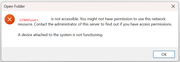
In explorer (win 11, inc. latest updates) and connecting as "user1", I can see and access all the Shared Folders. I can also see the home directory, shared as "user1". However, when I doubleclick it, I get the following Windows error message from Explorer: \\TNAS\user1 is not accessible. You might not have permission to use this network resource. Contact the administrator of this server to find out if you have access permission. A device attached to the system is not functioning. See the screenshot attached.
In the Shared Folders tab on the Control Panel, I don't see an entry for the home directories. In the user settings, I don't see anything related to SMB and in the advanced settings for users I can uncheck or check the 'enable user home directories' setting, but I can't modify the permissions for the user home directories.
So far, everything I've done is through the GUI and I'm stuck. How do I check and (if necessary, fix) the SMB permissions for the home directories? By the way, in case it is relevant (because it was mentioned somewhere for an earlier version of TOS): it is possible that volume synchronization hadn't completed yet by the time I started creating the users.
If someone can give me a step by step troubleshooting procedure, that would be highly appreciated!
For my non-admin user "user1", I have figured out how to set permissions for Shared Folders that I configured in the Control Panel. I have enabled user home directories as well.
In explorer (win 11, inc. latest updates) and connecting as "user1", I can see and access all the Shared Folders. I can also see the home directory, shared as "user1". However, when I doubleclick it, I get the following Windows error message from Explorer: \\TNAS\user1 is not accessible. You might not have permission to use this network resource. Contact the administrator of this server to find out if you have access permission. A device attached to the system is not functioning. See the screenshot attached.
In the Shared Folders tab on the Control Panel, I don't see an entry for the home directories. In the user settings, I don't see anything related to SMB and in the advanced settings for users I can uncheck or check the 'enable user home directories' setting, but I can't modify the permissions for the user home directories.
So far, everything I've done is through the GUI and I'm stuck. How do I check and (if necessary, fix) the SMB permissions for the home directories? By the way, in case it is relevant (because it was mentioned somewhere for an earlier version of TOS): it is possible that volume synchronization hadn't completed yet by the time I started creating the users.
If someone can give me a step by step troubleshooting procedure, that would be highly appreciated!