Honour Installation Path for PlexMedia Server
Posted: 27 Dec 2025, 12:51
Feature Request: Allow Applications to Fully Honor User-Selected Installation Volume Instead of Hardcoding Metadata to Volume1
I am writing to propose an enhancement to the Application Center in TOS 7 (and future versions) regarding application installation paths, particularly for apps like Plex Media Server.
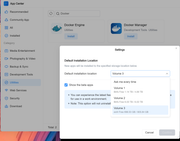
Currently, users can specify a default installation volume in the Application Center settings (e.g., Volume3/@apps for binaries and core files).
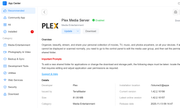
However, certain applications, such as Plex Media Server, create a dedicated shared folder named "Plex" on Volume1 for storing metadata, databases, thumbnails, cache, and transcoding files. This occurs regardless of the selected installation volume, appearing to be a hardcoded behavior.
While this ensures consistency and proper permissions for the hidden "plex" application user, it limits flexibility for users with multi-volume setups. For instance:
It forces metadata storage on Volume1, which may be the system volume with limited capacity or higher priority for OS-related data.
It prevents full consolidation of application data on a dedicated high-capacity volume, complicating space management and backups.
Volume 1 folder view:
Requested Feature:
Please implement support for applications to fully respect the user-defined default installation path. This could include:
Storing all application-related data (including metadata, libraries, and cache) on the selected volume.
Optionally, providing a per-application setting to override the metadata path if needed for backward compatibility.
Ensuring the hidden application user (e.g., "plex") has appropriate permissions and home directory on the chosen volume.
This enhancement would provide greater control over storage allocation, align with user expectations when selecting an installation volume, and improve usability for advanced configurations without compromising stability.
Thank you for considering this suggestion. I believe it would benefit many users managing larger or specialized storage pools.
rigveda
Model: F5-221
TOS Version: 7.0.0309
I am writing to propose an enhancement to the Application Center in TOS 7 (and future versions) regarding application installation paths, particularly for apps like Plex Media Server.
Currently, users can specify a default installation volume in the Application Center settings (e.g., Volume3/@apps for binaries and core files).
However, certain applications, such as Plex Media Server, create a dedicated shared folder named "Plex" on Volume1 for storing metadata, databases, thumbnails, cache, and transcoding files. This occurs regardless of the selected installation volume, appearing to be a hardcoded behavior.
While this ensures consistency and proper permissions for the hidden "plex" application user, it limits flexibility for users with multi-volume setups. For instance:
It forces metadata storage on Volume1, which may be the system volume with limited capacity or higher priority for OS-related data.
It prevents full consolidation of application data on a dedicated high-capacity volume, complicating space management and backups.
Volume 1 folder view:
Code: Select all
rigvedauser@TNAS:/Volume1/Plex# ls -l
total 0
drwxr-xr-x+ 1 plex plex 38 Dec 26 23:36 Library
drwxrwxr-x+ 1 plex plex 80 Dec 26 23:36 tmp_transcoding
Requested Feature:
Please implement support for applications to fully respect the user-defined default installation path. This could include:
Storing all application-related data (including metadata, libraries, and cache) on the selected volume.
Optionally, providing a per-application setting to override the metadata path if needed for backward compatibility.
Ensuring the hidden application user (e.g., "plex") has appropriate permissions and home directory on the chosen volume.
This enhancement would provide greater control over storage allocation, align with user expectations when selecting an installation volume, and improve usability for advanced configurations without compromising stability.
Thank you for considering this suggestion. I believe it would benefit many users managing larger or specialized storage pools.
rigveda
Model: F5-221
TOS Version: 7.0.0309