Page 1 of 2

[Help] For connecting TNAS to respond to assigned subnet IP address

Posted: 26 Dec 2025, 23:11
by petrose
Connecting to wired TNAS PC, I managed to finalizing setup:
  • addition of SSD's first 1 TB
  • Obtained TOS (latest): TOS_X642.0_6.0.783 and installed it
  • Added additional 3 sticks, one at the time, each 2 TB
  • Succesfully synched and formatted as BTRFS
  • Added volumes to Storage Pool and made it TRAID
  • Prepared my network switch, to accomodate additional devices within subnet 192.168.86.*
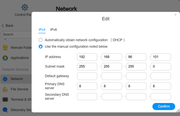
  • And lastly, changed IP Address from the local wired access, to becoming node .101 in above subnet
I took down my Win 11 PC firewall/protection, and tried to access my TNAS using its static IP: 192.168.86.101:
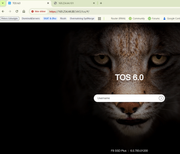
Time out using browser

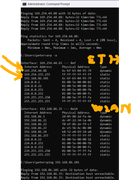
Tried to ping, using CMD line:
Destination host unreachable

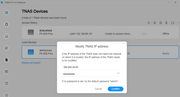
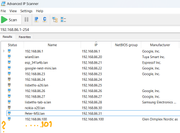
Tried to scan subnet, using the suggested Scanning Tool: No endpoint with address 192.168.86.101
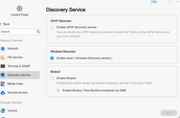
Followed the Article of checking here: viewtopic.php?p=26886#p26886
I passed all items, AFAIK but I haven't yet allowed router to pass traffic on port 5443 (I assume that won't affect how TNAS should behave on my private network).

Any clues why my TNAS cannot be seen on the network ?

See various screenshots attached of situation:
Image

Image

Image

Image

Image

Image

Re: [Help] For connecting TNAS to respond to assigned subnet IP address

Posted: 27 Dec 2025, 08:57
by CursaYang
After manually editing the NAS's IP address in your second image, can you log in to the NAS using the new IP?

Re: [Help] For connecting TNAS to respond to assigned subnet IP address

Posted: 27 Dec 2025, 19:13
by Gremlin
Might help if the 'default gateway' were included.

Re: [Help] For connecting TNAS to respond to assigned subnet IP address

Posted: 27 Dec 2025, 22:14
by petrose
CursaYang wrote: 27 Dec 2025, 08:57
No, as said below the bullet list: Browser access gives timeout

Re: [Help] For connecting TNAS to respond to assigned subnet IP address

Posted: 27 Dec 2025, 22:16
by petrose
Gremlin wrote: 27 Dec 2025, 19:13
Thanks, good suggestion, will give it a try...
Need to re-cable TNAS to laptop, so have to see tomorrow.

Re: [Help] For connecting TNAS to respond to assigned subnet IP address

Posted: 01 Jan 2026, 00:46
by petrose
Additional symptoms supplied:
Eth interface on the back, shows steady green light on the top and steady orange light at the bottom.
See image
Image

Re: [Help] For connecting TNAS to respond to assigned subnet IP address

Posted: 02 Jan 2026, 21:15
by CursaYang
petrose wrote: 01 Jan 2026, 00:46 Additional symptoms supplied:
Eth interface on the back, shows steady green light on the top and steady orange light at the bottom.
See image
It is normal for the Ethernet interface lights to display orange and green.

Re: [Help] For connecting TNAS to respond to assigned subnet IP address

Posted: 02 Jan 2026, 21:41
by petrose
CursaYang wrote: 02 Jan 2026, 21:15
petrose wrote: 01 Jan 2026, 00:46 Additional symptoms supplied:
Eth interface on the back, shows steady green light on the top and steady orange light at the bottom.
See image
It is normal for the Ethernet interface lights to display orange and green.
Thanks, I thought so.
What else can I do to pursue towards a workable TNAS, I am running out of ideas ?

Re: [Help] For connecting TNAS to respond to assigned subnet IP address

Posted: 03 Jan 2026, 18:30
by petrose
Hi, I still cannot even ping device (gives: Destination host unreachable) and its not showing up in my subnet !

Time is running out. If I cannot get this TNAS working by tomorrow Jan 4, I need to return my F8 SSDPlus bought thru Amazon.
I will pull out my costly SSD's beforehand, of course.

Re: [Help] For connecting TNAS to respond to assigned subnet IP address

Posted: 04 Jan 2026, 10:59
by TMnight
According to the screenshot information above, when the IP address of the NAS is set to 168.254.44.88, it can be accessed normally; however, when it is changed to 192.168.86.101, access becomes impossible. I suggest that you first check the network address configuration of your computer. Additionally, considering that there may be some delays in forum responses, to resolve your issue more promptly, you can visit the official website and contact the online customer service through the live chat feature. At the same time, send them this forum post so that they can quickly follow up and handle your problem.