Allow App Installation on Non-RAID (Single-Disk) Volumes in TOS 7 – Currently Only RAID Volumes Are Selectable
Posted: 21 Dec 2025, 04:03
Request / Issue:
I would like to install applications (Docker containers, etc.) on the 1 TB SSD for better performance, but the TOS 7 App Center only allows installation on the two RAID-based volumes created from the HDD pool. The SSD volume (single-disk, non-RAID) does not appear as a selectable installation location, even though it is properly formatted as ext4 and visible in the Volumes list.
Additional Information:
I have manually edited /etc/volume/volume.conf to register the SSD as a valid volume, but it still does not appear in the App Center's volume selection dropdown.
I do not need high availability or redundancy on this SSD; I am fine with rebuilding it manually if the disk fails.
Desired Feature:
Please enable the ability to select any valid volume (including single-disk/non-RAID volumes) for application installation in TOS 7, or provide an official workaround to register a single-disk SSD volume so that it can be used as an app installation target.
This would greatly improve performance for users who want to run apps from an SSD while keeping data on HDD pools.
Thank you for your consideration!
Further details
I have installed TOS 7 beta: 7.0.0299
BIOS: MAPL0304V17
Model: F5-221
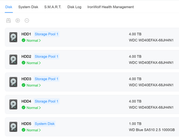
I have 5 Disks installed: 4x Western Digital HDD (4 TB), and 1x SSD Blue 1TB.
I have created 1 storage Pool for the 4x WD HDDs, and created 2 Volumes in that Pool (fully utilised). The System disk is installed on the 1TB SSD.
When I look at the disk, A very small portion is used by the OS/ System, while almost 840 GB is free. I created an ext4 filesystem on that to hopefully be used.
I don’t need high availability on that disk, and if I loose the disk, I can simply rebuild it if required. However, I do want my apps to be installed on this SSD to have high performance.

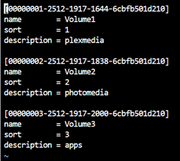
I modified the /etc/volume/volume.conf to add the following as well:
However in volumes it shows this:
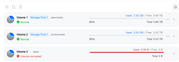
I suspect it is because it is not a true RAID volume.
How do I get my Apps that I install to select Volume 3 as I have created it?
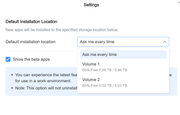
The picture above only shows these 2 valid volumes.
Thanks!
I would like to install applications (Docker containers, etc.) on the 1 TB SSD for better performance, but the TOS 7 App Center only allows installation on the two RAID-based volumes created from the HDD pool. The SSD volume (single-disk, non-RAID) does not appear as a selectable installation location, even though it is properly formatted as ext4 and visible in the Volumes list.
Additional Information:
I have manually edited /etc/volume/volume.conf to register the SSD as a valid volume, but it still does not appear in the App Center's volume selection dropdown.
I do not need high availability or redundancy on this SSD; I am fine with rebuilding it manually if the disk fails.
Desired Feature:
Please enable the ability to select any valid volume (including single-disk/non-RAID volumes) for application installation in TOS 7, or provide an official workaround to register a single-disk SSD volume so that it can be used as an app installation target.
This would greatly improve performance for users who want to run apps from an SSD while keeping data on HDD pools.
Thank you for your consideration!
Further details
I have installed TOS 7 beta: 7.0.0299
BIOS: MAPL0304V17
Model: F5-221
I have 5 Disks installed: 4x Western Digital HDD (4 TB), and 1x SSD Blue 1TB.
I have created 1 storage Pool for the 4x WD HDDs, and created 2 Volumes in that Pool (fully utilised). The System disk is installed on the 1TB SSD.
When I look at the disk, A very small portion is used by the OS/ System, while almost 840 GB is free. I created an ext4 filesystem on that to hopefully be used.
I don’t need high availability on that disk, and if I loose the disk, I can simply rebuild it if required. However, I do want my apps to be installed on this SSD to have high performance.
I modified the /etc/volume/volume.conf to add the following as well:
However in volumes it shows this:
I suspect it is because it is not a true RAID volume.
How do I get my Apps that I install to select Volume 3 as I have created it?
The picture above only shows these 2 valid volumes.
Thanks!