Implementing UPS Shutdown with TOS NUT
Posted: 15 Dec 2025, 21:35
Terramaster TOS - Configuring NUT for UPS Power off
Introduction
I like ZFS. A friend ignored my suggestion of getting an IXSystems 4 Disk NAS and purchased instead a Terramaster F4-424 Pro. Once I learned how awesome the hardware was and that TrueNAS Scale run’s great on it, I chose to purchase and experiment with the native TNAS TOS.
Having used APCUPSD and NUT under FreeBSD, TrueNAS Core and TrueNAS Scale, I was surprised how challenging it was to configure NUT for a UPS power off on a TNAS TOS device.
I found TOS implements NUT in a mysterious way.
The GUI creates /etc/ups_v2.config which I don’t want to touch.
NUT config files live in /etc/nut but some are stomped on by GUI changes.
Lastly /etc/nut/upssched.conf calls /usr/bin/upsctl. This is a custom binary which has no documentation. Hopefully a future TOS GUI will expose the changes required for UPS Power Off. For now, these notes outline small adjustments to achieve this.
It’s taken me many days to grind my way through this with CoPilot and Gemini 3 kinda helping along the way.
I know it's a bit clunky but it works for what I need. Hopefully it will help you.
Please note, I only purchased this device to learn TOS for this friend. Having played with TOS for several weeks now, it’s great for the Newbie but the lack of ZFS is a show stopper for me.
Once I’m completed letting the community know of these findings, I’m moving on to TrueNAS Scale for further experiments. I’m not coming back to TOS unless there is a really good reason.
That said if someone has suggestions to improve my changes, please do test them yourself or find another person who will and share with the community. TOS wont be on my machine for much longer. I’ve got many things to learn with recent ZFS NVMe improvements and this device is perfect for it.
Intent
Configure NUT with a supported UPS
Implement a 1 minute wait time after a power outage
Ensure WinNut clients can communication with the Terramaster
Implement a graceful shutdown of the Terramaster Device
Ensure the appropriate signal is passed to the UPS for it’s power off
My Device
Terramaster F4-424 Pro
TOS 6.0.794
Boot/InitBoot MADN0101.V06
Using TOS Gui
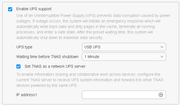
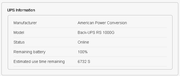
NUT Client
For a NUT Client I use WinNUT-2.0.0.4a. I know it’s old but it’s solid, easy to configure and troubleshoot https://code.google.com/archive/p/winnut/downloads
Nut Port 3493 Possibly filtered before reboot
Thankfully the default NUT Port of 3493 is used.
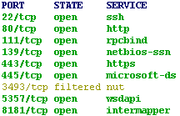
After enabling UPS support, NMAP revealed Port 3493 was filtered
A reboot later showed Port 3493 was open
In case you ask, I have no TOS Firewall settings. My device was built from scratch with no configuration settings related to Security DoS or Firewall
This appears relevant as WinNut connects and soon drops after.
These implications may affect other Clients trying to communicate with your Terramaster device.
These are the logs from WinNUT-2.0.0.4a on Windows 11.
Level INFO 11/30/2025 11:08:56 UPS: ups@tnas1 (slave) (power value 1)
Level ALERT 11/30/2025 11:08:56 WinNUTUpsMon Service is starting to monitor UPS
Level ERROR 11/30/2025 11:09:18 UPS [ups@tnas1]: connect failed: Connection failure: Unknown error
Level NOTICE 11/30/2025 11:09:18 Communications with UPS ups@tnas1 lost
Level ERROR 11/30/2025 11:09:46 UPS [ups@tnas1]: connect failed: Connection failure: Unknown error
Level NOTICE 11/30/2025 11:09:46 UPS ups@tnas1 is unavailable
Level ERROR 11/30/2025 11:10:13 UPS [ups@tnas1]: connect failed: Connection failure: Unknown error
Level ERROR 11/30/2025 11:10:41 UPS [ups@tnas1]: connect failed: Connection failure: Unknown error
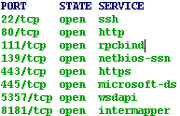
This is a NMAP Portscan before Set TNAS as a Network UPS Server is checked
This is a NMAP Portscan after Set TNAS as a Network UPS Server is checked
This is a NMAP Portscan after Set TNAS as a Network UPS Server is checked the device is rebooted
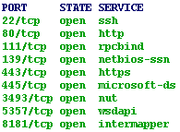
WinNUT-2.0.0.4a is completely stable after a TOS reboot. Hope this little discovery saves you some time with whatever clients you are using.
NUT Clients MONITOR username and secret
Your NUT clients will need the MONITOR username and secret. This is an example for WinNut
MONITOR ups@tnas 1 monuser password slave
The MONITOR username and secret are stored in /etc/nut/upsd.users.
I needed to make no changes to /etc/nut/upsd.users
I have no idea if this can be edited without the GUI stomping on it.
I’ve blanked out the password, below
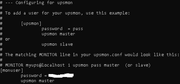
/etc/nut/upsmon.conf
The TOS upsmon.conf defaults remarked out the following line. I removed the remark
SHUTDOWNCMD "/sbin/shutdown -h +0"
/etc/nut/upssched.conf
The TOS upssched.conf defaults calls /usr/bin/upsctl. I cannot find any documentation on this file. I remarked it out.
Ai helped me write an alternative script called /usr/local/sbin/upssched-cmd
#CMDSCRIPT /usr/bin/upsctl
CMDSCRIPT /usr/local/sbin/upssched-cmd
/usr/local/sbin/upssched-cmd
This script honours /etc/killpower. It appears to not be required. I kept it in to prevent errors at boot.
/usr/sbin/upsdrvsvcctl shutdown is the real shutdown command.
Please note if SHUTDOWNCMD "/sbin/shutdown -h +0" was remarked out, /usr/sbin/upsdrvsvcctl shutdown will only power off the UPS. It will not power off the NAS.
Please test your environment out before putting this into production.
#!/bin/sh
case "$1" in
fsd)
logger -t upssched "Forced shutdown triggered"
# Write the baton file with the correct magic string
echo "upsmon-powerdown" > /etc/killpower
sync
# Coordinated shutdown: NAS halts, then UPS cuts outlets
/usr/sbin/upsdrvsvcctl shutdown
;;
onbatt)
logger -t upssched "UPS switched to battery"
;;
online)
logger -t upssched "Power restored"
;;
nocomm)
logger -t upssched "Lost communication with UPS"
;;
*)
logger -t upssched "Unknown event: $1"
;;
esac
Make upssched-cmd executable
chmod +x /usr/local/sbin/upssched-cmd
I reboot my NAS for these configuration changes to take place before testing.
You might be able to avoid a reboot by running these commands
systemctl stop nut-monitor nut-server nut-driver
systemctl start nut-driver
systemctl start nut-server
systemctl start nut-monitor
I hope this helps
Take care
Steve Quinn
PS - Updates to my findings if any will be shared with my source notes in this Google Docs File.
https://docs.google.com/document/d/1Kqo ... it?tab=t.0
Introduction
I like ZFS. A friend ignored my suggestion of getting an IXSystems 4 Disk NAS and purchased instead a Terramaster F4-424 Pro. Once I learned how awesome the hardware was and that TrueNAS Scale run’s great on it, I chose to purchase and experiment with the native TNAS TOS.
Having used APCUPSD and NUT under FreeBSD, TrueNAS Core and TrueNAS Scale, I was surprised how challenging it was to configure NUT for a UPS power off on a TNAS TOS device.
I found TOS implements NUT in a mysterious way.
The GUI creates /etc/ups_v2.config which I don’t want to touch.
NUT config files live in /etc/nut but some are stomped on by GUI changes.
Lastly /etc/nut/upssched.conf calls /usr/bin/upsctl. This is a custom binary which has no documentation. Hopefully a future TOS GUI will expose the changes required for UPS Power Off. For now, these notes outline small adjustments to achieve this.
It’s taken me many days to grind my way through this with CoPilot and Gemini 3 kinda helping along the way.
I know it's a bit clunky but it works for what I need. Hopefully it will help you.
Please note, I only purchased this device to learn TOS for this friend. Having played with TOS for several weeks now, it’s great for the Newbie but the lack of ZFS is a show stopper for me.
Once I’m completed letting the community know of these findings, I’m moving on to TrueNAS Scale for further experiments. I’m not coming back to TOS unless there is a really good reason.
That said if someone has suggestions to improve my changes, please do test them yourself or find another person who will and share with the community. TOS wont be on my machine for much longer. I’ve got many things to learn with recent ZFS NVMe improvements and this device is perfect for it.
Intent
Configure NUT with a supported UPS
Implement a 1 minute wait time after a power outage
Ensure WinNut clients can communication with the Terramaster
Implement a graceful shutdown of the Terramaster Device
Ensure the appropriate signal is passed to the UPS for it’s power off
My Device
Terramaster F4-424 Pro
TOS 6.0.794
Boot/InitBoot MADN0101.V06
Using TOS Gui
NUT Client
For a NUT Client I use WinNUT-2.0.0.4a. I know it’s old but it’s solid, easy to configure and troubleshoot https://code.google.com/archive/p/winnut/downloads
Nut Port 3493 Possibly filtered before reboot
Thankfully the default NUT Port of 3493 is used.
After enabling UPS support, NMAP revealed Port 3493 was filtered
A reboot later showed Port 3493 was open
In case you ask, I have no TOS Firewall settings. My device was built from scratch with no configuration settings related to Security DoS or Firewall
This appears relevant as WinNut connects and soon drops after.
These implications may affect other Clients trying to communicate with your Terramaster device.
These are the logs from WinNUT-2.0.0.4a on Windows 11.
Level INFO 11/30/2025 11:08:56 UPS: ups@tnas1 (slave) (power value 1)
Level ALERT 11/30/2025 11:08:56 WinNUTUpsMon Service is starting to monitor UPS
Level ERROR 11/30/2025 11:09:18 UPS [ups@tnas1]: connect failed: Connection failure: Unknown error
Level NOTICE 11/30/2025 11:09:18 Communications with UPS ups@tnas1 lost
Level ERROR 11/30/2025 11:09:46 UPS [ups@tnas1]: connect failed: Connection failure: Unknown error
Level NOTICE 11/30/2025 11:09:46 UPS ups@tnas1 is unavailable
Level ERROR 11/30/2025 11:10:13 UPS [ups@tnas1]: connect failed: Connection failure: Unknown error
Level ERROR 11/30/2025 11:10:41 UPS [ups@tnas1]: connect failed: Connection failure: Unknown error
This is a NMAP Portscan before Set TNAS as a Network UPS Server is checked
This is a NMAP Portscan after Set TNAS as a Network UPS Server is checked
This is a NMAP Portscan after Set TNAS as a Network UPS Server is checked the device is rebooted
WinNUT-2.0.0.4a is completely stable after a TOS reboot. Hope this little discovery saves you some time with whatever clients you are using.
NUT Clients MONITOR username and secret
Your NUT clients will need the MONITOR username and secret. This is an example for WinNut
MONITOR ups@tnas 1 monuser password slave
The MONITOR username and secret are stored in /etc/nut/upsd.users.
I needed to make no changes to /etc/nut/upsd.users
I have no idea if this can be edited without the GUI stomping on it.
I’ve blanked out the password, below
/etc/nut/upsmon.conf
The TOS upsmon.conf defaults remarked out the following line. I removed the remark
SHUTDOWNCMD "/sbin/shutdown -h +0"
/etc/nut/upssched.conf
The TOS upssched.conf defaults calls /usr/bin/upsctl. I cannot find any documentation on this file. I remarked it out.
Ai helped me write an alternative script called /usr/local/sbin/upssched-cmd
#CMDSCRIPT /usr/bin/upsctl
CMDSCRIPT /usr/local/sbin/upssched-cmd
/usr/local/sbin/upssched-cmd
This script honours /etc/killpower. It appears to not be required. I kept it in to prevent errors at boot.
/usr/sbin/upsdrvsvcctl shutdown is the real shutdown command.
Please note if SHUTDOWNCMD "/sbin/shutdown -h +0" was remarked out, /usr/sbin/upsdrvsvcctl shutdown will only power off the UPS. It will not power off the NAS.
Please test your environment out before putting this into production.
#!/bin/sh
case "$1" in
fsd)
logger -t upssched "Forced shutdown triggered"
# Write the baton file with the correct magic string
echo "upsmon-powerdown" > /etc/killpower
sync
# Coordinated shutdown: NAS halts, then UPS cuts outlets
/usr/sbin/upsdrvsvcctl shutdown
;;
onbatt)
logger -t upssched "UPS switched to battery"
;;
online)
logger -t upssched "Power restored"
;;
nocomm)
logger -t upssched "Lost communication with UPS"
;;
*)
logger -t upssched "Unknown event: $1"
;;
esac
Make upssched-cmd executable
chmod +x /usr/local/sbin/upssched-cmd
I reboot my NAS for these configuration changes to take place before testing.
You might be able to avoid a reboot by running these commands
systemctl stop nut-monitor nut-server nut-driver
systemctl start nut-driver
systemctl start nut-server
systemctl start nut-monitor
I hope this helps
Take care
Steve Quinn
PS - Updates to my findings if any will be shared with my source notes in this Google Docs File.
https://docs.google.com/document/d/1Kqo ... it?tab=t.0