Page 1 of 1
Unable to create hypercache
Posted: 19 Nov 2025, 17:57
by mattf
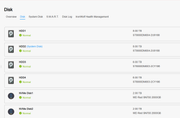
I have 2 NVME SSD disks installed that are not part of the storage pool.
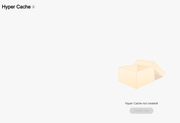
But when I go to Hypercache, it says Hypercache not created and the Create New button is greyed out.
What can I do?
Re: Unable to create hypercache
Posted: 19 Nov 2025, 23:14
by CursaYang
What is the current version of TOS you are running? Are these two SSDs used as system disks? SSDs that have already been used as system disks cannot be created as hyper cache.
Re: Unable to create hypercache
Posted: 20 Nov 2025, 00:34
by mattf
TOS 6
Not used as system disks.
I did have a hypercache on one of them - which I deleted when I added the 2nd SSD in, but now I am unable to create the new one.
Re: Unable to create hypercache
Posted: 20 Nov 2025, 00:36
by mattf
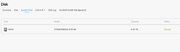
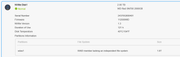
Both SSD disks have this partition ??
Re: Unable to create hypercache
Posted: 20 Nov 2025, 09:31
by TMzethar
Regarding the M.2 NVMe SSD that was previously used as an SSD Cache, did you delete it through the page or just simply remove?
The SSD used as an Hyper Cache has all its space divided into one partition. The SSD with one partition you mentioned should be the one you used for SSD Cache before.
The situation you described is quite unusual, and we currently do not have enough information to locate the issue. Please generate and download the system report package in TOS Desktop > Technical Support > Report Issues, then download and send it to our support mailbox for inspection.
Technical team: support(at)terra-master.com
Please attach the URL of this forum post.
Re: Unable to create hypercache
Posted: 14 Dec 2025, 05:55
by LarryBudzenski
Hello, did you ever get this figured out?
@TMzethar - Your response does not make sense. The poster gave you all of the information with screenshots. I am having the same issue. I bought a Terramaster in part for the hypercache, but am unable to get it going no matter what I do.
Re: Unable to create hypercache
Posted: 14 Dec 2025, 19:05
by TMbuddy
Hello! I have already replied to you in another post. Please try again. If the issue persists, please generate and download the system report package in TOS Desktop > Technical Support > Report Issues, then download and send it to our support mailbox for inspection.
Technical team: support(at)terra-master.com
Please attach the URL of this forum post.