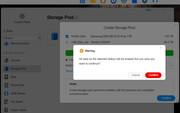
Wasted space on system SSD?
Posted: 17 Oct 2025, 03:10
I've just set up a F6-424 Max with TOS6. I put two 1tb SSDs in the m.2 slots -- one for system and the other for the hyper cache. I just realized that there's a whole lotta wasted space on that system drive. Is it possible to use that extra space for snapshots? I haven't added the Snapshot app yet -- could I save the snapshots there? I'd prefer not to put them on my TRAID volume.
Both those SSDs are Gen4. I have another new Gen4 SSD that's only 256gb -- I assume that'd be enough for just the System Drive. If I *can't* use the unused space for Snapshots, can I just clone the 1tb System SSD to the smaller 256gb drive?
Thanks for the help. Although I've had NASes for a long-time, this is my first TerraMaster so I expect I'll be back with questions. This community seems really helpful.
Thanks, again.
Both those SSDs are Gen4. I have another new Gen4 SSD that's only 256gb -- I assume that'd be enough for just the System Drive. If I *can't* use the unused space for Snapshots, can I just clone the 1tb System SSD to the smaller 256gb drive?
Thanks for the help. Although I've had NASes for a long-time, this is my first TerraMaster so I expect I'll be back with questions. This community seems really helpful.
Thanks, again.