Page 1 of 1
[Help] "4TB" SSDs with different capacity
Posted: 15 Oct 2025, 09:21
by derekjr
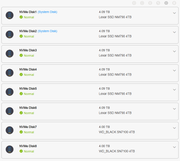
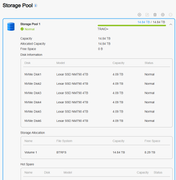
I recently set up an F8 SSD Plus, and created a TRAID+ storage pool with 6 x 4TB Lexar drives (reported as 4.09TB capacity each in TOS). Really happy with it, and I saw some WD 4TB on sale, so I grabbed two of those to fill the remaining two slots, and tried to add them to the storage pool, but the option is greyed out. I assume it's because they are slightly smaller capacity (The WD drives report 4.0 TB in TOS)?
Is there anything I can do in this case to retain the storage pool and expand it? Or would I have to re-create it, so it sees 4.0 TB as the smallest drive?
Thanks for any help!
Re: [Help] "4TB" SSDs with different capacity [SOLVED]
Posted: 15 Oct 2025, 11:28
by CursaYang
Hello, the Lexar you are using is not a standard 4T SSD. It typically has some capacity masked off from a larger capacity SSD, so the system recognizes it as 4.09T.
If you need to use the current WD SSDs, you can only choose to rebuild the storage pool. First, install two WD SSDs, then install the remaining six SSDs.
You can also keep the current storage pool and create a new storage pool using two WD SSDs.
Re: [Help] "4TB" SSDs with different capacity
Posted: 15 Oct 2025, 12:08
by derekjr
Interesting; I didn't know about that sort of thing w/ Lexar. Thanks for the info! I'll prob return the WDs if I can, and get two more identical Lexar (or one bigger WD for now)

Re: [Help] "4TB" SSDs with different capacity
Posted: 21 Mar 2026, 11:14
by SalvadorFCarney
CursaYang wrote: ↑15 Oct 2025, 11:28
Hello, the Lexar you are using is not a standard 4T SSD. It typically has some capacity masked off from a larger capacity SSD, so the system recognizes it as 4.09T.
If you need to use the current WD SSDs, you can only choose to rebuild the storage pool. First, install two WD SSDs, then install the remaining six SSDs.
You can also keep the current storage pool and create a new storage pool using two WD SSDs.
That's great, thank you