[Help] D8-332 Mac OS Error code - 50
Posted: 07 Oct 2025, 08:11
Help to understand and solve.
I Have a D8-332 Thunderbolt setup in Raid 5 (8 Disks 20TB Western Digital Red) - ExFat - Setup using iOS - M2 Tahoe.
I've copied 15TB onto the Raid then I get an error code - 50, unable to copy or create new folders.
I ran first aid on the drive it came back saying it failed, and the available space went from 124TB to 8TB. On computer restart & second Disk utility First aid the space came back it said it was successful, but still unable to write to the drive. I have tried reformatting the drives and recopying everything over but the same issue occurred.
Any solutions to this would be great.
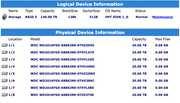
I Have a D8-332 Thunderbolt setup in Raid 5 (8 Disks 20TB Western Digital Red) - ExFat - Setup using iOS - M2 Tahoe.
I've copied 15TB onto the Raid then I get an error code - 50, unable to copy or create new folders.
I ran first aid on the drive it came back saying it failed, and the available space went from 124TB to 8TB. On computer restart & second Disk utility First aid the space came back it said it was successful, but still unable to write to the drive. I have tried reformatting the drives and recopying everything over but the same issue occurred.
Any solutions to this would be great.