Page 1 of 1

D5 - What speeds are you getting?

Posted: 12 Sep 2025, 09:44
by edgley
Im trying to get to the bottom of my low speed.
I have a D5, linked via TB. It has 5 x 4TB - these are general hard drives only.

I have just nuked my macOS install.

And, here are the results:
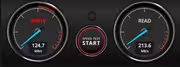
Image

A quick google and I find this:
You get double the write speed and 4 disks worth of read speed. I prefer striped mirrors over parity RAID. Should be ~200-300MB/s sequential writes. And even with random reads and writes, you get double the IOPS as well, but HDDs are always bad at this.
Interleave must be matched to the format allocation unit size. So if 5 disks in parity 1, that means 4 drives are getting data written to them. 256K interleave * 4 = 1024MB. So format the volume at 1M allocation unit. Or 512KB * 4 = 2048 so format at 2M. These get very good write performance (for raid5 anyway).
If you have 6 disks in parity 1, you will never have good write performance since you cannot match data stripes to units written in a direct ratio. Always use 3 drives or 5 drives in a parity 1 array (so 2 drives or 4 drives written to), or 10 drives in parity 2 (8 drives written to). Anything else has terrible write speed.
Any one else care to post their speeds please?
Cos I am thinking I need to replace the D5 with an OWC offering.

Re: D5 - What speeds are you getting?

Posted: 12 Sep 2025, 14:43
by CursaYang
On D5, what RAID mode are you using? What are the models of these hard drives, and are they on our compatibility list?
Please check if the cables and interfaces used are standard Thunderbolt 3 protocol. You can try updating the Thunderbolt 3 interface driver and the RAID controller driver.

Re: D5 - What speeds are you getting?

Posted: 13 Sep 2025, 01:16
by edgley
My bad, all that info and no reference that its for RAID5.

As for the disks, like I mentioned, they are just 4TB disks - will have to check the compatibility list.
- I know this is wrong
- Target speed is 200 to 300
- I am getting 130 MB/s write / 180 MB/s read
- Looks like I am getting about half what I should.

The cable is the original one that shipped = it does have the lightning symbol on it.
- System Report shows that it is linked via TB

As I am Mac there is only a RAID controller driver and I downloaded the one in the link, version 4.24.0_220608


I am doing my best to get the data off, then build it as RAID0 this time. This will give me the best speed old skool hard disks can deliver.
Ive just checked - 4TB SSD and NVMe are the same price at £200 each, so that's a grand.
As its gonna be RAID0 I can't even start off with 2 and add - Im at about 10TB camera footage and about another 4TB of stock.

Im just getting my old (very) Mac Pro 3.1 up and running. As I can RAID 5 disks its a shame I cannot connect it via a fast enough to use connection.

Re: D5 - What speeds are you getting?

Posted: 13 Sep 2025, 18:51
by ColaChen
In the D5 product, configure the two hard drives connected to the SATA1 and SATA2 interfaces into a RAID 0 array. Because only the RAID 0 mode can achieve theoretically high speed through the "striping" technology, which distributes data to multiple hard drives for parallel reading and writing. In addition, you can also check the transmission rate of the hard drives themselves and whether there are other settings or processes in the system that affect storage performance to eliminate their impact on the target transmission speed.

Re: D5 - What speeds are you getting?

Posted: 17 Sep 2025, 21:03
by edgley
My plan was to get the data backed up and turn all five HD into a RAID 0 - that way offering the max possible that mechanical hard drives can.