[Help] F6-424 losing network connection
Posted: 10 Sep 2025, 21:10
Hi everybody, I don't know if it is the right section for this problem but with the information I have right now it seems right.
I deployed an F6-424 in an office of two photographer friends who where previously working on usb attached drives for backing up all of their work photos.
In that F6-424 there are 4 Seagate Exos 20 TB drives model ST20000DM001-3y3103 configured in Traid with a total capacity of 54,54TB as reported from the NAS; those models are not on the compatibility list, neither approved neither not approved, but those where what was available for them at the cost they could afford and since there where on the compatibility list similar drives with lesser capacity I thought they where good.
As soon as the pool was available using the usb-copy app on the TOS desktop I copied all of their archived photos on the NAS from all of their usb drives for a total of 25.59 TB without an issue.
When the operation of copying their Archives was completed I instructed them how to copy their day to day work from their network connected computers, two PCs and two Macs, into the NAS.
After a few days of working they called me for help because they could not copy new photos anymore.
The Nas was not visible an the network anymore from the PC, accessing the ISP issued modem-router the NAS was not visible there either.
I was forced to long press the power button on the NAS because there where not any more option available for me to access it.
After a few days the problem presented again, forcing again a power off.
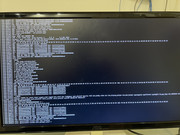
After reading a few post on this forum today I connected a monitor to the nas to see the messages on the screen when the problem presented itself again, as soon as the problem arised again I made a photo that I will attach here.
Not a Linux expert so I could not interpret the information on the screen nor i could scroll the screen up to see all what was on it since attaching a keyboard didn't work.
Since it will be useful here the information on the NAS.
F6-424
TOS version 6.0.770
Bios/initboot version MADN0102.V06
Let me know if any more information is needed.
I deployed an F6-424 in an office of two photographer friends who where previously working on usb attached drives for backing up all of their work photos.
In that F6-424 there are 4 Seagate Exos 20 TB drives model ST20000DM001-3y3103 configured in Traid with a total capacity of 54,54TB as reported from the NAS; those models are not on the compatibility list, neither approved neither not approved, but those where what was available for them at the cost they could afford and since there where on the compatibility list similar drives with lesser capacity I thought they where good.
As soon as the pool was available using the usb-copy app on the TOS desktop I copied all of their archived photos on the NAS from all of their usb drives for a total of 25.59 TB without an issue.
When the operation of copying their Archives was completed I instructed them how to copy their day to day work from their network connected computers, two PCs and two Macs, into the NAS.
After a few days of working they called me for help because they could not copy new photos anymore.
The Nas was not visible an the network anymore from the PC, accessing the ISP issued modem-router the NAS was not visible there either.
I was forced to long press the power button on the NAS because there where not any more option available for me to access it.
After a few days the problem presented again, forcing again a power off.
After reading a few post on this forum today I connected a monitor to the nas to see the messages on the screen when the problem presented itself again, as soon as the problem arised again I made a photo that I will attach here.
Not a Linux expert so I could not interpret the information on the screen nor i could scroll the screen up to see all what was on it since attaching a keyboard didn't work.
Since it will be useful here the information on the NAS.
F6-424
TOS version 6.0.770
Bios/initboot version MADN0102.V06
Let me know if any more information is needed.