[Help] Error reading file [SOLVED]
Posted: 27 Aug 2025, 21:15
Hi team,
I’ve recently deployed a new F4-424 Pro in our business environment. All computers are running Windows 10 and are connecting via network drive using the server’s IP address.
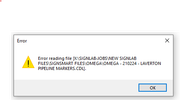
We are experiencing an issue with CAD files (.CDL from SignLab). When these files are stored in certain folder structures, we receive the error message:
“Error reading file”
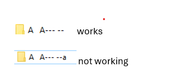
This issue seems to occur under the following conditions:
Could you please confirm if this is a known issue, or if there are any recommended workarounds?
I’ve recently deployed a new F4-424 Pro in our business environment. All computers are running Windows 10 and are connecting via network drive using the server’s IP address.
We are experiencing an issue with CAD files (.CDL from SignLab). When these files are stored in certain folder structures, we receive the error message:
“Error reading file”
This issue seems to occur under the following conditions:
- Folder names include a hyphen (-)
Folder names include spaces
Folder names exceed 10 characters
Could you please confirm if this is a known issue, or if there are any recommended workarounds?