Page 1 of 2
[Help] HDD size inaccurate
Posted: 15 Aug 2025, 22:03
by simpleas0
In my F4-212 I have one 8TB.
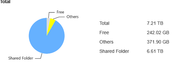
In Storage Manager>Volume it shows the max storage as 7.21tb and the used space at 6.97tb with 242.66gb left over, but when I type df -h it shows the max storage as 7.3tb and 6.7tb used but still shows the available space as 243gb. Also when editing the volume it says the capacity is 7442.09 but it's clearly not using that. It's also not my system drive
How would I go about showing the correct size? I can see there are different partitions (/sda1-/sda4) but the first three only take up less than 10gb so I'm not sure what's happening exactly. I transferred the files over from a failing 8tb and all the files are the same with nothing added on and my old drive had about 400gb remaining, even this drive I deleted some stuff that existed on the old one
I recently updated to TOS6 as well so not sure if that has anything to do with it.
Any help would be greatly appreciated
EDIT:
Upon checking the usage details, I've discovered there is 371.90gb of 'others', I'm not sure what that is but how can I get rid of it or merge it into the main partition??
Re: [Help] HDD size inaccurate
Posted: 16 Aug 2025, 00:17
by Gremlin
'Other' is typically snapshots (File system snapshots or via the snapshot app).
Re: [Help] HDD size inaccurate
Posted: 16 Aug 2025, 10:13
by GevinKe
The “Other” section usually includes the following types of system usage and cache files:
Space used by the file system itself and cache files generated during operation
- Space occupied by snapshots (Snapshot)
- Storage space allocated to virtual disks (LUNs)
- Temporary cache files generated by the TOS system or installed applications
We recommend checking whether you have performed the following:
- Have you created any snapshots? (You can check under Desktop > Backup > File System Snapshot)
- Have you created any virtual disks (LUNs)? (You can confirm under iSCSI Manager > LUN)
These may all be counted as part of the “Other” usage. If they are no longer needed, you may delete them to free up storage space.
Re: [Help] HDD size inaccurate
Posted: 16 Aug 2025, 12:21
by simpleas0
GevinKe wrote: ↑16 Aug 2025, 10:13
The “Other” section usually includes the following types of system usage and cache files:
Space used by the file system itself and cache files generated during operation
- Space occupied by snapshots (Snapshot)
- Storage space allocated to virtual disks (LUNs)
- Temporary cache files generated by the TOS system or installed applications
We recommend checking whether you have performed the following:
- Have you created any snapshots? (You can check under Desktop > Backup > File System Snapshot)
- Have you created any virtual disks (LUNs)? (You can confirm under iSCSI Manager > LUN)
These may all be counted as part of the “Other” usage. If they are no longer needed, you may delete them to free up storage space.
I don't have any saved snapshots or virtual disks created, none of my disks are BTRFS so I'm not able to use the file system snapshot
I don't have any extra applications installed on the system either
Re: [Help] HDD size inaccurate
Posted: 16 Aug 2025, 12:48
by simpleas0
Gremlin wrote: ↑16 Aug 2025, 00:17
'Other' is typically snapshots (File system snapshots or via the snapshot app).
I looked for that too but I've never set up any file snapshots :/
Re: [Help] HDD size inaccurate
Posted: 16 Aug 2025, 16:43
by FredMutter
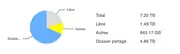
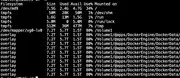
I do have the same question with more than 800 GB of "others"
1 - I didn't install the snapshot App
2 - I do use EXT4 (with v6.0.x see signature)
3 -
I found that docker images belong to others and I have a lot of containers (but not so much to explain this big others size).
And old unused containers were deleted (using portainer).
>docker system df
TYPE TOTAL ACTIVE SIZE RECLAIMABLE
Images 11 11 6.213GB 0B (0%)
Containers 11 10 289.8MB 23.74kB (0%)
Local Volumes 25 1 803.6MB 803.6MB (99%)
Build Cache 0 0 0B 0B
Re: [Help] HDD size inaccurate
Posted: 16 Aug 2025, 20:40
by GevinKe
Your issue may require our engineers to conduct remote troubleshooting in order to accurately identify the cause. For this, we recommend that you schedule remote technical support as follows:
Please visit our official website and contact Online Support (LiveChat) to make an appointment.
When communicating, please also provide the forum link or the page link with your issue details to the support staff.
Our support team will coordinate with the engineers and arrange a suitable time with you for remote assistance.
Re: [Help] HDD size inaccurate
Posted: 16 Aug 2025, 22:06
by FredMutter
Do you think I should also contact the support?
I do Time Machine Backups which takes 400 GB. Does it count in others !?
Re: [Help] HDD size inaccurate
Posted: 17 Aug 2025, 11:45
by TMnick
FredMutter wrote: ↑16 Aug 2025, 22:06
Do you think I should also contact the support?
I do Time Machine Backups which takes 400 GB. Does it count in others !?
Yes, Time Machine backups are also counted under "Other." I don't think remote technical support is necessary at this time unless there are other issues. The storage calculation itself is accurate—it's just that the UI doesn't clearly explain what's included in "Other," which can be confusing. We're also looking into ways to optimize the storage breakdown to make it more intuitive and clear.
Re: [Help] HDD size inaccurate
Posted: 17 Aug 2025, 14:02
by FredMutter
suggestion:
a new button to export as a detailed list could be a solution (or another tab with a textbox)