Page 1 of 2
[Help] TNAS Network card keeps losing connection
Posted: 14 Aug 2025, 23:19
by corycet
Network card keeps losing connection on the TNAS. I can reboot the TNAS and will work again for a short while. Its random, anywhere between 5 minutes to 30 minutes. It does this on the two 1gig ports and the one 10gig ports. Can this be fixed or is it hardware failure? Unit is about 2-3 years old.
Re: [Help] TNAS Network card keeps losing connection
Posted: 15 Aug 2025, 00:35
by sianderson
corycet wrote: ↑14 Aug 2025, 23:19
Network card keeps losing connection on the TNAS. I can reboot the TNAS and will work again for a short while. Its random, anywhere between 5 minutes to 30 minutes. It does this on the two 1gig ports and the one 10gig ports. Can this be fixed or is it hardware failure? Unit is about 2-3 years old.
are you sure its the network card thats losing the connection or is it the whole nas drive? reason for asking this expereinced similar issues with my F2-210 by using unsupported hard drives in the drive bays, it would "fall off" the network as in become unpingable etc so similar symptoms but not nas drive failure but hard drives (i guess its the nature of TOS actually running from the hard drives rather than its own storage)
cured by using a different SSD drive as its system drive and then putting the unsupported larger disks in a USB enclosure its now stable again
Re: [Help] TNAS Network card keeps losing connection
Posted: 15 Aug 2025, 16:12
by CursaYang
Apart from hard disk failure causing this issue, high system resource usage leading to system congestion could also be the cause.
Please first check the hard disk.
After the device starts, monitor the system resource usage.
Re: [Help] TNAS Network card keeps losing connection
Posted: 15 Aug 2025, 23:54
by corycet
I don't think it is hard drive related because my drives are on the supported list and show healthy. I checked the resources, and they look ok as well.

Re: [Help] TNAS Network card keeps losing connection
Posted: 16 Aug 2025, 09:46
by GevinKe
Hello, we’re very sorry for the inconvenience you’ve experienced.
May I ask, does the network disconnect automatically even when no operations are performed or no large data transfers are in progress?
To help us more efficiently identify and reproduce the issue, could you please provide the following information:
- The current TOS version running on your system
Re: [Help] TNAS Network card keeps losing connection
Posted: 17 Aug 2025, 02:24
by corycet
The model number is F5-422
The current TOS version is 5.1.145
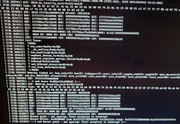
I hooked up a monitor to the TNAS to see what was happening. When it lost connectivity, it stated kernel panic - not syncing: Fatal exception in interrupt. I attached a picture to show the trace.
Re: [Help] TNAS Network card keeps losing connection
Posted: 17 Aug 2025, 09:38
by TMjack
Hello, based on the analysis of the image information you provided, the preliminary judgment suggests a possible memory failure. May I ask if you have added or replaced the memory yourself? Additionally, there is currently a 2GB expansion memory module installed on the motherboard. We recommend removing it and then conducting a startup test to observe whether the issue persists.
Re: [Help] TNAS Network card keeps losing connection
Posted: 18 Aug 2025, 09:25
by corycet
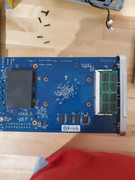
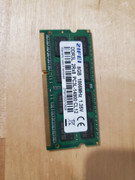
I removed the RAM chip as requested. I did add this about 1 year ago as I heard these tend to run better with additional RAM. I included pictures of the RAM location and the RAM itself.
Re: [Help] TNAS Network card keeps losing connection
Posted: 18 Aug 2025, 09:30
by corycet
Less than 10 minutes without the ram installed I got the kernel panic message again and lost connection.
Re: [Help] TNAS Network card keeps losing connection
Posted: 18 Aug 2025, 16:37
by CursaYang
corycet wrote: ↑18 Aug 2025, 09:30
Less than 10 minutes without the ram installed I got the kernel panic message again and lost connection.
Is there any error message displayed when the NAS is connected to a monitor?
In addition to the added memory stick, the NAS's original memory stick may also have issues. You can use the Memtest 86+ software to perform a test.