[Help] F4-424 not accessible after update to 6.0.530
Posted: 06 Aug 2025, 01:31
I was finally looking forward to updating my F4-424. I was coming from 5.1.145, which came with the device when I bought it new last November. I looked at the upgrade information, and it showed that it should be a straight upgrade to 6.0.530. I downloaded the bin file, backed up my configuration, and proceeded the upgrade. Initially, the upgrade appeared to go fine, after about 15 mins it was upgraded. But after a couple of hours I noticed from the phone app that I could no log into it, saying bad un/pwd. I went to the computer and tried, same thing. I had to do a shutdown on the device via the button. After the reboot everything was ok again.
I noticed my Proxmox could no longer see the NAS, I was going to look at the NFS and SMB settings and adjust them as necessary. At some point I started adjusting the bond on the interface because, of course that what set back to default due to the upgrade. At some point there were many changes that I had made prior to the upgrade that I thought I could use my back config to change some things back to the way they were. After that is when I seemed to be having issues now.
I have the TNAS Windows app opened during this troubleshooting so I can see it getting seen.
When the NAS boots up with all the disks inserted, either it can get an IP from DHCP or it defaults to 169.x.x.x. Either way, it now shows it as Uninitialized.

Now, if I get a 169.x.x.x IP and then give it an IP since DHCP failed, I can never reach it in the browser, I just get a 404 error.
In the current state at where I am right now, it has assigned an IP, but when try to go to the TNAS, it takes me to an Initialization screen, as if I have never used it before or something got corrupt. It starts a countdown talking about automatically setting up my device and pools again.
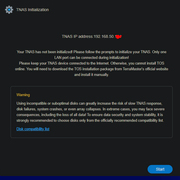
If I hit ESC and choose to load the bootloader, it then proceeds to a disk to install the OS.
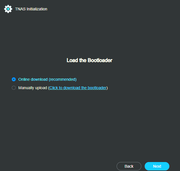
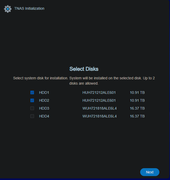
Is this trying to reinstall the TNAS software again, if it that is the case am I going to lose all my data?
I noticed my Proxmox could no longer see the NAS, I was going to look at the NFS and SMB settings and adjust them as necessary. At some point I started adjusting the bond on the interface because, of course that what set back to default due to the upgrade. At some point there were many changes that I had made prior to the upgrade that I thought I could use my back config to change some things back to the way they were. After that is when I seemed to be having issues now.
I have the TNAS Windows app opened during this troubleshooting so I can see it getting seen.
When the NAS boots up with all the disks inserted, either it can get an IP from DHCP or it defaults to 169.x.x.x. Either way, it now shows it as Uninitialized.
Now, if I get a 169.x.x.x IP and then give it an IP since DHCP failed, I can never reach it in the browser, I just get a 404 error.
In the current state at where I am right now, it has assigned an IP, but when try to go to the TNAS, it takes me to an Initialization screen, as if I have never used it before or something got corrupt. It starts a countdown talking about automatically setting up my device and pools again.
If I hit ESC and choose to load the bootloader, it then proceeds to a disk to install the OS.
Is this trying to reinstall the TNAS software again, if it that is the case am I going to lose all my data?