Delete old BTRFS snapshots after migration from TNAS 5 to 6
Posted: 28 Jul 2025, 20:45
Just wanted to share my journey because it took me way more time than I expected and maybe that helps others.
Yesterday I figured out I have a bunch of snapshots that are not visible in the Backup app under "File system snapshots"
A while ago I upgraded to TNAS 6 on my F2-423 which required a factory reset. After that the Backup > File System snapshot Feature was disabled and I enabled it again.
Since I went low on diskspace for my main volume I moved files and deleted all snapshots to free up space but that did not free the space.
I figured out I had a lot of old snapshots (100, the number I configured to keep, to be precise) oldest from 2013
while newly created snapshots look like this
I only could see the newly created snapshots in the Backup app > File system Snapshot list, so I tried deleting them manually
shows that /Volume1 is only mounted to @ so I mounted the root
now I can see both the old and new snapshots
But I still couldn't delete the old snapshots.
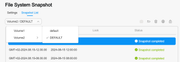
I went out of ideas and didn't find a way to delete the snapshots. I just wanted to give up but than I figured out, the backup > File system snapshot list contains a dropdown for the location where I could switch from Volume1/default to Volume1/DEFAULT and delete all snapshots
Anyway, this was not trivial and I'd suggest everybody who migrated from TNAS 5 to TNAS 6 and uses BTRFS with snapshots should check for this to reclaim some space.
After deleting all the old snapshots I only have one dropdown per Volume and not two.
Yesterday I figured out I have a bunch of snapshots that are not visible in the Backup app under "File system snapshots"
A while ago I upgraded to TNAS 6 on my F2-423 which required a factory reset. After that the Backup > File System snapshot Feature was disabled and I enabled it again.
Since I went low on diskspace for my main volume I moved files and deleted all snapshots to free up space but that did not free the space.
I figured out I had a lot of old snapshots (100, the number I configured to keep, to be precise) oldest from 2013
Code: Select all
btrfs subvolume list  /Volume1 | grep snap
...
ID 707 gen 1291 top level 5 path @syssnapshot/DEFAULT/GMT+08-2023.01.04-04.00.00
ID 708 gen 1281 top level 707 path @syssnapshot/DEFAULT/GMT+08-2023.01.04-04.00.00/@apps
ID 709 gen 1282 top level 707 path @syssnapshot/DEFAULT/GMT+08-2023.01.04-04.00.00/@cache
ID 710 gen 1283 top level 707 path @syssnapshot/DEFAULT/GMT+08-2023.01.04-04.00.00/@desktop
ID 711 gen 1284 top level 707 path @syssnapshot/DEFAULT/GMT+08-2023.01.04-04.00.00/@system
ID 712 gen 1285 top level 707 path @syssnapshot/DEFAULT/GMT+08-2023.01.04-04.00.00/DockerData
ID 713 gen 1286 top level 707 path @syssnapshot/DEFAULT/GMT+08-2023.01.04-04.00.00/Plex
ID 714 gen 1287 top level 707 path @syssnapshot/DEFAULT/GMT+08-2023.01.04-04.00.00/User
ID 716 gen 1289 top level 707 path @syssnapshot/DEFAULT/GMT+08-2023.01.04-04.00.00/public
ID 717 gen 1290 top level 707 path @syssnapshot/DEFAULT/GMT+08-2023.01.04-04.00.00/virtualbox
...
Code: Select all
ID 34893 gen 1510527 top level 5 path @syssnapshot/default/GMT+02-2025.07.28-09.15.00
ID 34894 gen 1509356 top level 34893 path @syssnapshot/default/GMT+02-2025.07.28-09.15.00/public
ID 34895 gen 1509357 top level 34893 path @syssnapshot/default/GMT+02-2025.07.28-09.15.00/homes
ID 34896 gen 1509358 top level 34893 path @syssnapshot/default/GMT+02-2025.07.28-09.15.00/@system
ID 34897 gen 1509359 top level 34893 path @syssnapshot/default/GMT+02-2025.07.28-09.15.00/@apps
ID 34898 gen 1509360 top level 34893 path @syssnapshot/default/GMT+02-2025.07.28-09.15.00/@desktop
ID 34899 gen 1510522 top level 34893 path @syssnapshot/default/GMT+02-2025.07.28-09.15.00/@DockerData
ID 34900 gen 1509362 top level 34899 path @syssnapshot/default/GMT+02-2025.07.28-09.15.00/@DockerData/btrfs/subvolumes/b9f0e9fd262fd0c68fd5801e1509eaab0499aabadac50e1516fb363a00e41eed
ID 36061 gen 1510523 top level 34893 path @syssnapshot/default/GMT+02-2025.07.28-09.15.00/Plex
ID 36062 gen 1510524 top level 34893 path @syssnapshot/default/GMT+02-2025.07.28-09.15.00/virtualbox
ID 36064 gen 1510526 top level 34893 path @syssnapshot/default/GMT+02-2025.07.28-09.15.00/Data
ID 36065 gen 1510527 top level 34893 path @syssnapshot/default/GMT+02-2025.07.28-09.15.00/@cache
Code: Select all
mount | grep btrfs
...
/dev/mapper/vg0-lv0 on /var/subvols/8vEbTxkKvwa type btrfs (rw,noatime,ssd,space_cache=v2,subvolid=5,subvol=/)
/dev/mapper/vg0-lv0 on /Volume1 type btrfs (rw,noatime,ssd,space_cache=v2,subvolid=30096,subvol=/@)
...
Code: Select all
sudo mkdir -p /mnt/root
sudo mount -o subvolid=5 /dev/mapper/vg0-lv0 /mnt/root
Code: Select all
master@TNAS:/mnt/btrfs-root/@syssnapshot# ls -l
total 0
drwx------ 1 master master 5200 Nov 22  2024 DEFAULT
drwx------ 1 master master  104 Jul 28 10:15 default
Code: Select all
btrfs property set -ts "/mnt/btrfs-root/@syssnapshot/DEFAULT/GMT+08-2023.01.04-20.00.01/@apps" ro false
master@TNAS:/# btrfs subvolume delete @syssnapshot/DEFAULT/GMT+08-2023.01.04-20.00.01/@apps
Delete subvolume (no-commit): '/mnt/btrfs-root/@syssnapshot/DEFAULT/GMT+08-2023.01.04-20.00.01/@apps'
ERROR: Could not destroy subvolume/snapshot: Operation not permitted
WARNING: deletion failed with EPERM, send may be in progress
Anyway, this was not trivial and I'd suggest everybody who migrated from TNAS 5 to TNAS 6 and uses BTRFS with snapshots should check for this to reclaim some space.
After deleting all the old snapshots I only have one dropdown per Volume and not two.