Page 1 of 2
[Help] Boot Truenas
Posted: 26 Jul 2025, 00:35
by lurgainn
Hi, I hope not to be off topic.
I bought a F4-424 MAX and I would love to test Truenas Community Edition (Scale), so after I removed the internal USB pendisk, in the BIOS I had set "Fast->TOS Boot First->Disabled" and then I had set "Boot->Boot Option #1->USB Device" (I can't see any reference to any UEFI device).
But whatevere system I use to write a new bootable USB pendisk with the ISO from Truenas (I used Ventoy, Gnome MultiWriter, the simple dd command; not Balena Etcher because it gives me an error) the NAS don't boot and it seems to me that it don't see the external USB pendisk.
So, what I'm doing wrong?
I'll appreciate any helps.
Thanks, best regards
Re: [Help] Boot Truenas
Posted: 26 Jul 2025, 01:46
by crisisacting
Of the solutions you listed, only ventoy has a UEFI option while setting up a USB drive; if you've used that, you should have had an error that allows you to add the drive to Secure Boot.
If it still errors out, disable
Secure Boot as current builds of TrueNAS don't support it (the 25.10 build of Scale will be gaining Secure Boot according to this post @
https://forums.truenas.com/t/secureboot ... s/13691/14).
Re: [Help] Boot Truenas
Posted: 26 Jul 2025, 06:51
by lurgainn
crisisacting wrote: ↑26 Jul 2025, 01:46
Of the solutions you listed, only ventoy has a UEFI option while setting up a USB drive; if you've used that, you should have had an error that allows you to add the drive to Secure Boot.
Thanks for your tip but, sorry, I don't understand. I use ventoy under linux (Xubuntu 25.04) and in the options I don't see any choice to set UEFI mode on the bootable USB. And if I leave the defaults options, when I boot my NAS and press F12, the only choice that I get is to enter the BIOS setup. In othe words the NAS don't see the pendisk as bootable.
Can you show me, step by step, what I need to do?
Thanks again
Re: [Help] Boot Truenas
Posted: 26 Jul 2025, 18:36
by RyanYang
Perhaps you could try reformatting the USB drive as FAT32 again and then restart the process of creating the bootable drive.
Re: [Help] Boot Truenas
Posted: 27 Jul 2025, 00:29
by lurgainn
I can't get any positive result

I tried with the "dd" command, with Ventoy alternating all possible options (MBR, GPT, Secure boot, Not Secure boot, ...), with KDE isoimagewriter, with usb-creator-gtk, with gnome-multi-writer, manually creating partitions with GParted and copying the files from ISO, but everything was useless: the NAS does not boot from my pendisk.
And I'm sure that the USB port is ok, because if I insert the original Terramaster's pendisk to boot/install TOS, then the NAS is ready to boot from that pendisk.
I don't know how to proceed and everything seems strange to me because it doesn't seem that others have already encountered these problems.
Any suggestion?
Re: [Help] Boot Truenas
Posted: 27 Jul 2025, 10:21
by TMjack
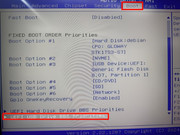
Please enter the BIOS setup interface, navigate to the "Boot" options section, and then set the USB device as the first boot priority.
Re: [Help] Boot Truenas
Posted: 27 Jul 2025, 18:22
by lurgainn
The problem is that I don't see these options. What I see in my "Boot" options section is this:
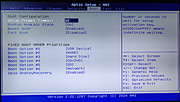
and whatever I insert into the USB port, they don't change at all.
Re: [Help] Boot Truenas
Posted: 27 Jul 2025, 19:58
by Gremlin
You probably do have to have a physical device with boot capability installed for the bios to recognise and detail optional choices. You intermingle both USB and "pendrive". What exactly are you working with?
Re: [Help] Boot Truenas
Posted: 27 Jul 2025, 21:06
by lurgainn
Gremlin wrote: ↑27 Jul 2025, 19:58
You probably do have to have a physical device with boot capability installed for the bios to recognise and detail optional choices. You intermingle both USB and "pendrive". What exactly are you working with?
I have a normal USB pendisk drive of 4GB.
As I already wrote, I first used "dd" command as explained into the documentation page on Truenas site. When it failed (the pendisk never was displayed in the boot options when I press F12 during boot time) I used all alternatives way displayed in that documentation page. So I used Ventoy, then all others Linux tools to create a bootable USB pendisk from a ISO image, but again with no success. I even wrote the ISO image onto a DVD and attached a DVD driver (put into a USB enclosure) with that DVD to the USB port of the NAS, but no luck. Ultimately I found an old version of Balena Etcher that run on my Xubuntu 25.04 without errors, but again, when I insert the resulting pendisk into a USB port of my F4-424 Max, it doesn't show as a bootable option. What I ever see when I come back into the Bios and the Boot page with the pendisk attached, is what I showed in my previous post.
Re: [Help] Boot Truenas
Posted: 27 Jul 2025, 21:57
by TMlinda
Or you can try to consult TrueNas official, follow the official TrueNas instructions to create a USB drive, and enable the TrueNAS USB drive as a boot drive.