Network UPS Tools (NUT) Failures continue
Posted: 24 Jul 2025, 19:28
TOS 6.0.750
Has been going on for a long time now:
Following represents a period of about 8 minutes following boot (continues remorselessly)
@TMSupport received from me "debug logs" on another issue but noted in an email:
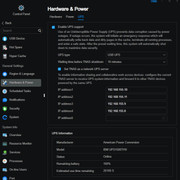
Tnas UPS server configuration: (Sample: IP address have changed since image}
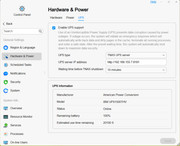
And the Client is as below which appears to work as it shows the active UPS data:
SO, can anyone @TMSupport explain why all the errors? And how to fix it? Seems to me most of this began when UPS configuration moved to http port 8181 rather than the standard NUT port (which service is still available on nas).
Has been going on for a long time now:
Following represents a period of about 8 minutes following boot (continues remorselessly)
Code: Select all
TM-super1@NAS-T2:/var/log# cat messages | grep -i failed | grep -i ups
Jul 24 11:45:48 NAS-T2 kernel: [   19.709909] systemd-sysv-generator[278]: stat() failed on /etc/init.d/ups-monitor, ignoring: No such file or directory
Jul 24 11:45:57 NAS-T2 kernel: [   81.310942] systemd-sysv-generator[3841]: stat() failed on /etc/init.d/ups-monitor, ignoring: No such file or directory
Jul 24 11:46:11 NAS-T2 nut-monitor[4137]: upsnotify: failed to notify about state NOTIFY_STATE_READY_WITH_PID: no notification tech defined, will not spam more about it
Jul 24 11:46:11 NAS-T2 systemd[1]: Failed to start Network UPS Tools - power devices information server.
Jul 24 11:46:12 NAS-T2 systemd[1]: [email protected]: Failed with result 'exit-code'.
Jul 24 11:46:12 NAS-T2 systemd[1]: Failed to start Network UPS Tools - device driver for ups.
Jul 24 11:46:18 NAS-T2 kernel: [  101.901254] systemd-sysv-generator[4278]: stat() failed on /etc/init.d/ups-monitor, ignoring: No such file or directory
Jul 24 11:46:18 NAS-T2 kernel: [  102.371964] systemd-sysv-generator[4305]: stat() failed on /etc/init.d/ups-monitor, ignoring: No such file or directory
Jul 24 11:46:27 NAS-T2 systemd[1]: [email protected]: Failed with result 'exit-code'.
Jul 24 11:46:27 NAS-T2 systemd[1]: Failed to start Network UPS Tools - device driver for ups.
...
Jul 24 11:52:33 NAS-T2 systemd[1]: [email protected]: Failed with result 'exit-code'.
Jul 24 11:52:33 NAS-T2 systemd[1]: Failed to start Network UPS Tools - device driver for ups.
Jul 24 11:52:48 NAS-T2 nut-monitor[6077]: upsnotify: failed to notify about state NOTIFY_STATE_READY_WITH_PID: no notification tech defined, will not spam more about it
Jul 24 11:52:49 NAS-T2 systemd[1]: Failed to start Network UPS Tools - power devices information server.
TM-super1@NAS-T2:/var/log# {WINS server issue fixed}It {"abnormal shutdown issue"} is likely caused by a sudden power outage.
At the same time, we observed records of the UPS service restarting over 80,000 times and abnormal records for the WiN Server.
If you confirm that there was no power outage during this period, then we believe the automatic restart may be related to the UPS itself.
What model is your UPS? Can you try connecting it to the mains power to see if similar abnormalities occur?
Code: Select all
TM-super1@NAS-T2:/# systemctl status [email protected]
○ [email protected] - Network UPS Tools - device driver for ups
     Loaded: loaded (/lib/systemd/system/[email protected]; disabled; vendor preset: enabled)
     Active: inactive (dead)
       Docs: man:upsdrvsvcctl(8)
             https://www.networkupstools.org/historic/v2.8.3/docs/man/upsdrvsvcctl.html
             man:ups.conf(5)
             https://www.networkupstools.org/historic/v2.8.3/docs/man/ups.conf.html
             man:nut.conf(5)
             https://www.networkupstools.org/historic/v2.8.3/docs/man/nut.conf.html

Jul 24 11:52:33 NAS-T2 nut-driver@ups[6004]: Network UPS Tools upsdrvctl - UPS driver controller 2.8.3 release
Jul 24 11:52:33 NAS-T2 nut-driver@ups[6004]: Can't start /usr/lib/nut/(null): No such file or directory
Jul 24 11:52:33 NAS-T2 systemd[1]: [email protected]: Control process exited, code=exited, status=1/FAILURE
Jul 24 11:52:33 NAS-T2 systemd[1]: [email protected]: Failed with result 'exit-code'.
Jul 24 11:52:33 NAS-T2 systemd[1]: Failed to start Network UPS Tools - device driver for ups.
Jul 24 11:52:48 NAS-T2 systemd[1]: [email protected]: Scheduled restart job, restart counter is at 26.
Jul 24 11:52:48 NAS-T2 systemd[1]: Stopped Network UPS Tools - device driver for ups.
Jul 24 11:52:48 NAS-T2 systemd[1]: Starting Network UPS Tools - device driver for ups...
Jul 24 11:52:48 NAS-T2 systemd[1]: [email protected]: Deactivated successfully.
Jul 24 11:52:48 NAS-T2 systemd[1]: Stopped Network UPS Tools - device driver for ups.
TM-super1@NAS-T2:/# systemctl status [email protected]
○ [email protected] - Network UPS Tools - device driver for ups
     Loaded: loaded (/lib/systemd/system/[email protected]; disabled; vendor preset: enabled)
     Active: inactive (dead)
       Docs: man:upsdrvsvcctl(8)
             https://www.networkupstools.org/historic/v2.8.3/docs/man/upsdrvsvcctl.html
             man:ups.conf(5)
             https://www.networkupstools.org/historic/v2.8.3/docs/man/ups.conf.html
             man:nut.conf(5)
             https://www.networkupstools.org/historic/v2.8.3/docs/man/nut.conf.html

Jul 24 11:52:33 NAS-T2 nut-driver@ups[6004]: Network UPS Tools upsdrvctl - UPS driver controller 2.8.3 release
Jul 24 11:52:33 NAS-T2 nut-driver@ups[6004]: Can't start /usr/lib/nut/(null): No such file or directory
Jul 24 11:52:33 NAS-T2 systemd[1]: [email protected]: Control process exited, code=exited, status=1/FAILURE
Jul 24 11:52:33 NAS-T2 systemd[1]: [email protected]: Failed with result 'exit-code'.
Jul 24 11:52:33 NAS-T2 systemd[1]: Failed to start Network UPS Tools - device driver for ups.
Jul 24 11:52:48 NAS-T2 systemd[1]: [email protected]: Scheduled restart job, restart counter is at 26.
Jul 24 11:52:48 NAS-T2 systemd[1]: Stopped Network UPS Tools - device driver for ups.
Jul 24 11:52:48 NAS-T2 systemd[1]: Starting Network UPS Tools - device driver for ups...
Jul 24 11:52:48 NAS-T2 systemd[1]: [email protected]: Deactivated successfully.
Jul 24 11:52:48 NAS-T2 systemd[1]: Stopped Network UPS Tools - device driver for ups.
TM-super1@NAS-T2:/# And the Client is as below which appears to work as it shows the active UPS data:
SO, can anyone @TMSupport explain why all the errors? And how to fix it? Seems to me most of this began when UPS configuration moved to http port 8181 rather than the standard NUT port (which service is still available on nas).
