

I. Preparation
1. Hardware Requirements
- TerraMaster F4 SSD device
- External USB network adapter (for temporary internet access, e.g., enx00e04c680003)
- Built-in 5G NIC (Realtek RTL8126, no default driver)
- USB drive (≥2GB, for creating Proxmox boot media)
- Monitor + HDMI cable + keyboard/mouse (for initial setup)
2. Software Resources
- Proxmox VE 8.4 ISO: https://enterprise.proxmox.com/iso/proxmox-ve_8.4-1.iso
- Realtek RTL8126 Driver: https://www.realtek.com/Download/List?cate_id=584
Example file: r8126-10.016.00.tar.bz2 - Bootable USB creation tool: Rufus Official Website
II. BIOS Configuration
1. Power on the device and press DEL to enter BIOS.
2. Set TOS Boot First to Disable, ensuring the system boots from the Proxmox USB.
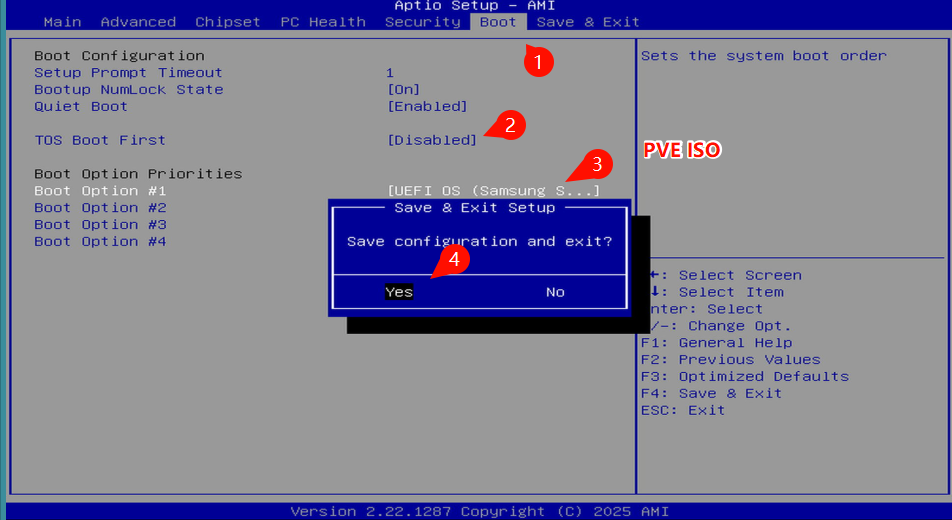
3. Save and exit BIOS (usually F4).
III. Install Proxmox VE 8.4
1. Follow the on-screen instructions to install Proxmox VE.
2. During installation, use the external USB NIC (e.g., enx00e04c680003) for internet access.
3. After installation, reboot into the Proxmox shell.
IV. Configure Software Repositories
1. Comment out the enterprise subscription repo:
Code: Select all
find /etc/apt/sources.list.d/ -type f -exec sed -i 's|^deb https://enterprise.proxmox.com|# deb https://enterprise.proxmox.com|' {} \;
Code: Select all
echo "deb http://download.proxmox.com/debian/pve bookworm pve-no-subscription" > /etc/apt/sources.list.d/pve-no-subscription.list
Code: Select all
apt update && apt full-upgrade -y
V. Install Kernel Headers and Build Tools
Code: Select all
apt install -y build-essential pve-headers-$(uname -r)
VI. Install RTL8126 Driver
1. Upload the driver package to the Proxmox host
Use SCP or USB to upload:
Code: Select all
scp r8126-10.016.00.tar.bz2 root@<PVE_IP>:/root/
Code: Select all
cd /root
tar -xjf r8126-10.016.00.tar.bz2
cd r8126-10.016.00
chmod +x autorun.sh
./autorun.sh
Code: Select all
reboot
VII. Configure Network Bridge with RTL8126
1. Identify network interfaces:
Code: Select all
ip link
- enx00e04c680003: External USB NIC
- enp1s0: Built-in RTL8126 NIC (after driver install)
Code: Select all
nano /etc/network/interfaces
Code: Select all
# Loopback interface
auto lo
iface lo inet loopback

# External USB NIC (no longer used)
iface enx00e04c680003 inet manual

# Bridge interface
auto vmbr0
iface vmbr0 inet static
    address 10.18.8.165/24       # Replace with your IP
    gateway 10.18.8.1            # Replace with your gateway
    bridge-ports enp1s0          # Use the RTL8126 NIC
    bridge-stp off
    bridge-fd 0

# Include additional configs
source /etc/network/interfaces.d/*
Code: Select all
reboot
VIII. Verify Driver and Network
1. Check if RTL8126 driver is loaded:
Code: Select all
lsmod | grep r8126
IX. Access the Proxmox VE Web Interface
Open your browser and visit:
Code: Select all
https://10.18.8.165:8006