Page 1 of 1
[Help] Can't Access TOS - Time Sync Issue
Posted: 30 Jun 2025, 01:10
by francmua
Hi there,
For months I've been having an issue where the time on the TNAS goes out of sync with the actual time. The TNAS time/date is 30mins ahead in the future. As I use an Authenticator to login, I can't login at all into my TNAS as the Auth code won't obviously work.
I don't have SSH enabled on the TNAS. I also tried using the terminal when plugging via HDMI + keyboard direct to the TNAS but I don't know a command that can help me reset the time/date back to what it should be so I can use my Authenticator again to login to TOS.
Can anyone help me or can I no longer access my own NAS??
Re: [Help] Can't Access TOS - Time Sync Issue
Posted: 30 Jun 2025, 14:19
by CursaYang
francmua wrote: ↑30 Jun 2025, 01:10
Hi there,
For months I've been having an issue where the time on the TNAS goes out of sync with the actual time. The TNAS time/date is 30mins ahead in the future. As I use an Authenticator to login, I can't login at all into my TNAS as the Auth code won't obviously work.
I don't have SSH enabled on the TNAS. I also tried using the terminal when plugging via HDMI + keyboard direct to the TNAS but I don't know a command that can help me reset the time/date back to what it should be so I can use my Authenticator again to login to TOS.
Can anyone help me or can I no longer access my own NAS??
You can use the 'date' command to check and modify the system time. Please provide a screenshot of the query and specify your timezone so we can confirm.
Re: [Help] Can't Access TOS - Time Sync Issue
Posted: 02 Jul 2025, 16:42
by francmua
Yeah I have used the date command and have managed to manually reset the time and I am able to login now. What is the best way to set time/date moving forward? Why was it going out of sync?
Re: [Help] Can't Access TOS - Time Sync Issue
Posted: 02 Jul 2025, 17:07
by CursaYang
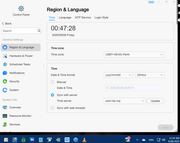
You can set the time server in Control Panel-General Settings-Region and Language-Time, and it will automatically synchronize with the time server.
Re: [Help] Can't Access TOS - Time Sync Issue
Posted: 08 Aug 2025, 00:21
by warlock00
I've had this time out of sync twice now.
Last time HomeAssistant wouldn't let me login because it said time was out of sync.
Just now was 25 mins out of sync.
My Frigate app was getting various recordings out of sync.
Each time I have to manually go to - Region & Language - Sync with server - Update
This is pretty crazy.
Re: [Help] Can't Access TOS - Time Sync Issue
Posted: 08 Aug 2025, 00:36
by warlock00
Damn it - I just updated from 694 to 770
Check the clock and its 13 mins in the future.
What is going on!?
Re: [Help] Can't Access TOS - Time Sync Issue
Posted: 08 Aug 2025, 00:52
by Gremlin
"Hey, Doc, we better back up. We don't have enough road to get up to 88."
Re: [Help] Can't Access TOS - Time Sync Issue
Posted: 08 Aug 2025, 11:07
by GevinKe
Hello,We sincerely apologize for the inconvenience caused.
The time synchronization issue you're experiencing may be due to one of the following reasons:
1. The NAS has been offline for an extended period.
2. The system has not automatically synchronized with the time server for a long time.
Based on your description, you've successfully synced the time using the date command, indicating that the server itself is functioning properly. This suggests that the issue likely lies in the failure of the automatic synchronization mechanism, i.e., the second case. We have reproduced and verified this issue in our lab: the NAS is supposed to auto-sync the time at a fixed interval each day, but this function is currently not being triggered as expected.
We have confirmed this as a functional bug and will schedule a fix.
Temporary solutions:
Until the issue is resolved, you may manually sync the time using one of the following methods:
1.Manually click the Update button in the interface at regular intervals.
2.Use the date command via SSH login (as you've already done successfully).
3.Switch the time synchronization method to Sync with web browser in the settings — browser time typically follows your device's system time zone and offers accurate synchronization.
Thank you for your patience and support.
Re: [Help] Can't Access TOS - Time Sync Issue
Posted: 08 Aug 2025, 18:58
by warlock00
That's good news. Thank you.