Page 1 of 3
[Help] f4-210 no longer recognizes hard drives
Posted: 27 Jun 2025, 09:59
by quesadilla79
A few days ago, I added several new media files to my f4-210 NAS via a mapped file drive. Everything seemed to work correctly.
Several hours later, I accessed my Emby media server hosted on the NAS via the browser and attempted to rescan the media folders. At that point it lost connection with my NAS. Since then, I have been able to reboot and have the NAS detected on my network using the TNAS PC app but when I attempt to login all I see is a "no hard drive detected prompt."
Before the issue, I was using all four bays each with a 10tb WD Red drive in a RAID 5 configuration.
I am not quite sure what my next troubleshooting step is but I have read several different suggestions, including resetting the device using the reset button on the back, so any advice would be appreciated.
Re: [Help] f4-210 no longer recognizes hard drives
Posted: 27 Jun 2025, 14:16
by MikeZhang
Please power off NAS, install all your hard drives properly, then power on NAS, check if your drives can be detected or not.
Re: [Help] f4-210 no longer recognizes hard drives
Posted: 28 Jun 2025, 07:57
by quesadilla79
Hello and thank you.
I have powered on the NAS with all 4 hard drives inserted. All lights are green, one for each HD, one for LAN, and one for power. The NAS is discoverable in the TNAS PC app but going to the browser login, it says "No Hard Drive Detected."
Re: [Help] f4-210 no longer recognizes hard drives
Posted: 28 Jun 2025, 12:33
by TMLila
quesadilla79 wrote: ↑28 Jun 2025, 07:57
Hello and thank you.
I have powered on the NAS with all 4 hard drives inserted. All lights are green, one for each HD, one for LAN, and one for power. The NAS is discoverable in the TNAS PC app but going to the browser login, it says "No Hard Drive Detected."
Hello! Would you mind trying to clear your browser cache first? Alternatively, could you please log in to your NAS device via the TNAS.PC app to check if you can access it successfully?
Re: [Help] f4-210 no longer recognizes hard drives
Posted: 30 Jun 2025, 04:51
by quesadilla79
Hello,
I have run external tests on all 4 hard drives using WD Kitfox. All 4 passed the short self test and short media test.
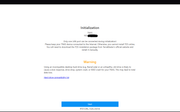
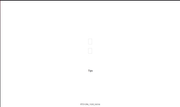
I have re inserted the four drives into the NAS and rebooted it, after clearing the cache. After waiting, I now see an initialization screen. When I click the blue start button, I next see a screen with two empty click/check boxes with no text. I can hover over the boxes and it looks like I can click them but without know what each box does, I haven't gone any further.
Re: [Help] f4-210 no longer recognizes hard drives
Posted: 30 Jun 2025, 14:38
by CursaYang
quesadilla79 wrote: ↑30 Jun 2025, 04:51
Hello,
I have run external tests on all 4 hard drives using WD Kitfox. All 4 passed the short self test and short media test.
I have re inserted the four drives into the NAS and rebooted it, after clearing the cache. After waiting, I now see an initialization screen. When I click the blue start button, I next see a screen with two empty click/check boxes with no text. I can hover over the boxes and it looks like I can click them but without know what each box does, I haven't gone any further.
Can you provide some screenshots to illustrate?
Re: [Help] f4-210 no longer recognizes hard drives
Posted: 01 Jul 2025, 08:32
by quesadilla79
Sure! Attached are two screen shots. The first is what loads in my browser from clicking "login" in the TNAS PC app on my desktop. The second is what I see after pressing the blue "start" button in the first browser screen.
Re: [Help] f4-210 no longer recognizes hard drives
Posted: 01 Jul 2025, 10:32
by TMjack
Hello!
Regarding the issue of incomplete page display during the initialization of the F4-210, you can refer to the methods provided in the following link:
viewtopic.php?t=5250. Additionally, could you please confirm again whether the device can successfully recognize the hard drive?
Re: [Help] f4-210 no longer recognizes hard drives
Posted: 01 Jul 2025, 10:36
by quesadilla79
Thank you, I will follow the instructions on that page.
And yes, it appears to recognize the hard drives now. It no longer indicates "No Hard Drive Detected" but instead the initialization prompt.
Re: [Help] f4-210 no longer recognizes hard drives
Posted: 02 Jul 2025, 09:26
by quesadilla79
Hello. I don't see a download version listed for f4-210 at that link. Which version is correct?
Thanks.