Page 1 of 1
D8 Hybrid drives disappearing on Mac?
Posted: 10 Jun 2025, 11:10
by AndrewU
Hi,
I have my D8 Hybrid connected to a Mac mini M1 for about the last 5 months, running the latest version of MacOS. It has 4 WD Red 3TB HDDs (2 in a RAID configuration) installed and a 2 TB drive in one of the NVME slots (Ediloca EN600 PRO SSD 2TB PCIe 3.0 Gen 3x4, NVMe M.2 2280).
Occasionally, the SSD will drop the connection to the Mac. It will unmount, and I can't locate it then in Disk Utility. It remains this way until I unmount all the drives and power cycle the D8 Hybrid. It will then show back up but for an undetermined amount of time - maybe a couple of days, r maybe a couple of weeks.
One time one of my HDDs disconnected also, and it was the same formula to get it back up and operational.
Any ideas how to fix this? Thanks!
Re: D8 Hybrid drives disappearing on Mac?
Posted: 10 Jun 2025, 11:34
by OrionXie
It might be an issue with signal instability. Try changing the USB port, USB cable, and adding a USB hub.
If that doesn't work, you can try updating following the tutorial at
viewtopic.php?t=6748.
Re: D8 Hybrid drives disappearing on Mac?
Posted: 11 Jun 2025, 05:49
by AndrewU
Thanks for the initial answer!
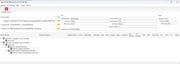
However, changing USB ports and cables did no good. I got my windows machine and connected it to the D8 in an attempt to update the firmware, but when I try to run the app myscreen info looks quite different than the one in the example See attachment.
Any other advice?
Thanks in advance!
Re: D8 Hybrid drives disappearing on Mac?
Posted: 11 Jun 2025, 17:04
by OrionXie
Please refer to the instructions for updating the firmware. The update requires an NVMe SSD that is connected to the computer and powered on.
Re: D8 Hybrid drives disappearing on Mac?
Posted: 29 Jul 2025, 07:01
by nthio
I experience the same issue with disappearing drives on Mac and a D8 hybrid. I have two D8 Hybrids and several drives. I think the only drive that hasn't dropped is one that I have a three-drive raid set created by MacOS.
To get the drives back I have to turn off the D8 and back on again. Is there a solution for this? I leave these connected to an always on server and it's frustrating when disks are randomly disappearing.
Re: D8 Hybrid drives disappearing on Mac?
Posted: 29 Jul 2025, 19:25
by TMzethar
nthio wrote: ↑29 Jul 2025, 07:01
Hi.
If you mentioned the HDD disconnection on Slot3 and Slot4 of the D8 Hybrid, please try referring to this firmware update:
viewtopic.php?t=7111
If you mentioned the SSD disconnection on the M.2 Slots of the D8 Hybrid, please try referring to this firmware update:
viewtopic.php?t=6748
Re: D8 Hybrid drives disappearing on Mac?
Posted: 14 Oct 2025, 12:53
by jcabreros
I just got a D5 Hybrid and am experiencing this issue. Being that this question is posed for Macs and the response is to download and install an update that only works on Windows, are there plans to make an update that works with Macs?
Re: D8 Hybrid drives disappearing on Mac?
Posted: 14 Oct 2025, 14:49
by CursaYang
Sorry, the upgraded software is currently only available for Windows version.
Re: D8 Hybrid drives disappearing on Mac?
Posted: 22 Oct 2025, 05:24
by MrLeeClarky
Hi, I performed the HDD firmware update on my D8 Hybrid today, but only bays 3 and 4 were available to update. Drives placed in bays 1 and 2 were not recognised by the updater software. Is this an intentional thing? Or don't the first 2 bays need updating?
Re: D8 Hybrid drives disappearing on Mac?
Posted: 22 Oct 2025, 17:37
by CursaYang
Hello, this firmware update is only applicable for issues related to duplicate M.2 SSD serial numbers and disconnections. If your current D8 does not have these problems, there is no need to update.