Page 1 of 1
TD2 Thunderbolt 3 won't boot after power outage [SOLVED]
Posted: 09 Jun 2025, 10:58
by RTL44
We had a very brief power outage where everything that was mounted to my Mac was disconnected. After rebooting my Mac and the TD2, the TD2 would not show up on the Desktop.
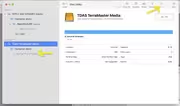
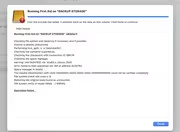
I ran Disk Utility and it said the drive had failed.
Is there any other solution to getting this to reboot without losing the data or doing a backup ?
Thanks in advance
Re: TD2 Thunderbolt 3 won't boot after power outage
Posted: 09 Jun 2025, 21:20
by OrionXie
RTL44 wrote: ↑09 Jun 2025, 10:58
Click on the gray, unmounted file system of the disk partition. In the Mac Disk Utility, click Repair to verify if the repair was successful. If it fails, you can only fix the partition file system issue using third-party software.
Re: TD2 Thunderbolt 3 won't boot after power outage
Posted: 10 Jun 2025, 07:21
by RTL44
Hi,
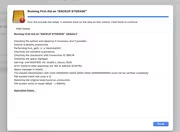
Thanks for the reply. I did try that.
Do you recommend a specific third party software?
Thanks again
Re: TD2 Thunderbolt 3 won't boot after power outage
Posted: 10 Jun 2025, 08:56
by OrionXie
RTL44 wrote: ↑10 Jun 2025, 07:21
We recommend repair software: DiskWarrior
Re: TD2 Thunderbolt 3 won't boot after power outage
Posted: 10 Jun 2025, 09:47
by RTL44
OK - Thank you. I used that years ago and it was very good. I didn't realize they were still around.
I just looked and it doesn't support APFS. That may rule it out for me.
Re: TD2 Thunderbolt 3 won't boot after power outage
Posted: 10 Jun 2025, 16:05
by OrionXie
RTL44 wrote: ↑10 Jun 2025, 09:47
Here are some software tools that support APFS format repair for hard drives; you may refer to them:
Drat, Disk Drill, TestDisk, Wondershare Recoverit (Wondershare Data Recovery Expert), Do Your Data Recovery for Mac Free.
Re: TD2 Thunderbolt 3 won't boot after power outage
Posted: 18 Jun 2025, 06:34
by RTL44
Thanks I will look into those others. I have Disk Drill, but it doesn't repair. It is just recovery software.