[Help] F2-223 name display and [SOLVED]
Posted: 05 Jun 2025, 20:16
Hi all
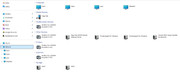
I recently installed a Terramaster F2-223 NAS on my home network with 2 10 TB WD RED drives. So far it is working great but I do have a couple of very minor issues that I can't figure out what the cause is and I'm hoping someone here can point me in the right direction. First issue is I named it NAS3(uppercase) during setup but my pcs all display it as nas3(lowercase). Second issue is that the NAS is not appearing as a network storage device when I look at my network connections in explorer. I am running Windows 11 on all my PCs. Please see the attached picture to see what I am talking about.
Thanks
I recently installed a Terramaster F2-223 NAS on my home network with 2 10 TB WD RED drives. So far it is working great but I do have a couple of very minor issues that I can't figure out what the cause is and I'm hoping someone here can point me in the right direction. First issue is I named it NAS3(uppercase) during setup but my pcs all display it as nas3(lowercase). Second issue is that the NAS is not appearing as a network storage device when I look at my network connections in explorer. I am running Windows 11 on all my PCs. Please see the attached picture to see what I am talking about.
Thanks