[Help] difficult emby access  [SOLVED]

Discussion on Emby media server, clients
Post Reply
User avatar
servit00
Posts: 32
Joined: 21 May 2025, 19:58
Italy

[Help] difficult emby access

Post by servit00 »

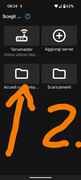
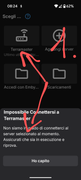
Good morning. Many times i find disconnected and it requier access. If i try emby username and password it answer as photo 2 and returns to select access mode. If i try with terramaster response as photo 1. Can anyone help? I am connected with tnas and tested this connection. Thanks Image
Image

Image
User avatar
IrisLi
TM Support
Posts: 134
Joined: 07 Aug 2023, 18:10

Re: [Help] difficult emby access

Post by IrisLi »

What is your system version and model?
1. Confirm that Emby is running on TNAS. You can go to the App Center-Installed Modules to check whether Emby is enabled.
2. Try to connect to the server manually. First, make sure that the phone and NAS are in the same LAN. Enter the server IP address + port number to connect. To find the server address, just open the Emby server management interface on the Emby server device (usually accessed through http://localhost:8096).
To contact our team, please send email to following addresses, remember to replace (at) with @
Technical team: support(at)terra-master.com (for technical support)
Service team: service(at)terra-master.com (for purchasing, return, replacement, RMA service)
User avatar
servit00
Posts: 32
Joined: 21 May 2025, 19:58
Italy

Re: [Help] difficult emby access

Post by servit00 »

IrisLi wrote: 02 Jun 2025, 17:47 What is your system version and model?
1. Confirm that Emby is running on TNAS. You can go to the App Center-Installed Modules to check whether Emby is enabled.
2. Try to connect to the server manually. First, make sure that the phone and NAS are in the same LAN. Enter the server IP address + port number to connect. To find the server address, just open the Emby server management interface on the Emby server device (usually accessed through http://localhost:8096).
Thanks. I solved when returned home under wifi. But an answer please. Emby free is not acxessible feom remote? Why sometimes work well?
User avatar
IrisLi
TM Support
Posts: 134
Joined: 07 Aug 2023, 18:10

Re: [Help] difficult emby access

Post by IrisLi »

servit00 wrote: 02 Jun 2025, 21:32
This may be due to the fact that the public IP is dynamic (changes frequently):
Many home networks have public IPs that change, and not setting up DDNS can cause access failure.
It is also possible that the port mapping failed after a NAS or router reboot:
Some devices may need to reconfigure port mapping after a reboot.
To contact our team, please send email to following addresses, remember to replace (at) with @
Technical team: support(at)terra-master.com (for technical support)
Service team: service(at)terra-master.com (for purchasing, return, replacement, RMA service)
User avatar
servit00
Posts: 32
Joined: 21 May 2025, 19:58
Italy

Re: [Help] difficult emby access  [SOLVED]

Post by servit00 »

IrisLi wrote: 02 Jun 2025, 21:56
servit00 wrote: 02 Jun 2025, 21:32
This may be due to the fact that the public IP is dynamic (changes frequently):
Many home networks have public IPs that change, and not setting up DDNS can cause access failure.
It is also possible that the port mapping failed after a NAS or router reboot:
Some devices may need to reconfigure port mapping after a reboot.
Thank you. Please i have ddns address built with fritzbox. Is possible and simply set so? Thanks again
User avatar
IrisLi
TM Support
Posts: 134
Joined: 07 Aug 2023, 18:10

Re: [Help] difficult emby access

Post by IrisLi »

servit00 wrote: 02 Jun 2025, 21:59
Yes, it could, theoretically, but we have not tried it relevantly. Perhaps the following emby connection information might help you:

https://emby.media/support/articles/Connectivity.html
To contact our team, please send email to following addresses, remember to replace (at) with @
Technical team: support(at)terra-master.com (for technical support)
Service team: service(at)terra-master.com (for purchasing, return, replacement, RMA service)
Post Reply

Return to “Emby Media Server”