[Help] Storage Pool disappeared while replacing at risk drive
Posted: 25 May 2025, 16:21
I have an f6 424-max. I had two drives reporting in risk (HDD4 & HDD6).
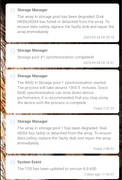
I started drive replacement by pulling a drive, inserting the new one and repairing the array. The first replacement (hdd6) went well and I got notification that synch was complete . I then pulled the second disk (hdd4) and immediately got an error saying the storage pool was degraded and that hdd4 and hdd6 had failed or detached. Checking settings hdd6 was still recognised. I returned hdd4 but no change, I rebooted the NAS and was faced with a popup that there was no storage pool and asked if I wanted to create one.
Ive shut down the nas and reseated all drives a couple of times times with no change.
A couple of days prior to the drive swap I updated software to 6.0.650
I started drive replacement by pulling a drive, inserting the new one and repairing the array. The first replacement (hdd6) went well and I got notification that synch was complete . I then pulled the second disk (hdd4) and immediately got an error saying the storage pool was degraded and that hdd4 and hdd6 had failed or detached. Checking settings hdd6 was still recognised. I returned hdd4 but no change, I rebooted the NAS and was faced with a popup that there was no storage pool and asked if I wanted to create one.
Ive shut down the nas and reseated all drives a couple of times times with no change.
A couple of days prior to the drive swap I updated software to 6.0.650