Page 1 of 1
[Help] High cpu usage and Hight Load F2-212
Posted: 23 May 2025, 20:04
by Toi74
Good morning,
I have an F2-212 with TOS 5.1.73-00078 and two 4TB Seagate Ironwolf HDs in TRAID.
The only active service is SMB and an installed app is USB Copy.
The NAS and HD are new with about 1 month of life.
Every time I go to the folders containing images through the TOS file manager, the CPU and the NAS load go to 95/100% blocking/slowing down the NAS. By closing the file manager, the CPU use and the load remain at 95/100% even for a few hours, making it difficult (and sometimes impossible) to use the NAS (even via Windows).
Same thing if I use TNAS mobile.
If I do the same thing from Windows file explorer everything works normally.
I wanted to know if anyone has had the same problem and if they managed to solve it in some way.
Thanks
Re: [Help] High cpu usage and Hight Load F2-212
Posted: 24 May 2025, 00:34
by Gremlin
If you use the nas file manager to manipulate/display file data, you are placing the entire workload on the nas cpu which is relatively low powered, limited cores/threads. If you are using a desktop file manager (over SMB or whatever) the main load is being taken by the desktop cpu - likely newer gen, more powerful and better graphics. I remember some time ago a comment from @TMsupport to use the desktop in preference.
Re: [Help] High cpu usage and Hight Load F2-212
Posted: 24 May 2025, 06:29
by MikeZhang
When the system prompts slow running, you can view the processes in the control panel and click CPU sort to check which processes occupy a large amount of CPU and memory. If you do not use this function, you can disable it.
Re: [Help] High cpu usage and Hight Load F2-212
Posted: 24 May 2025, 16:17
by Toi74
Good morning and thanks for the answers.
Gremlin, regarding using the desktop pc when I'm at home, there is no problem, the problem is if I'm away from home and use the phone. If I use Tnas Mobile it's like using the NAS file manager and I block everything. So I don't see the photos and I block other users who are using the nas.
MikeZhang, when the CPU and the load are at 100% it's difficult to access the processes page, however I managed to do it, it seems that most of the CPU is used by the thumbnail generation.
As I said, the biggest problem is that I can't use it when I'm away from home.
Re: [Help] High cpu usage and Hight Load F2-212
Posted: 24 May 2025, 21:52
by OrionXie
Toi74 wrote: ↑24 May 2025, 16:17
Terraphotos and search require significant computational resources.
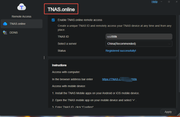
External network can enable TNAS Online, and by entering the TNAS ID in the TNAS App, remote access can be achieved.
Re: [Help] High cpu usage and Hight Load F2-212
Posted: 25 May 2025, 15:30
by Toi74
Orionxie, Terraphoto is not installed and I do not do research, I only do navigation.
As for Tnas Online, I tried it, but for practical purposes it allows access to the TOS of the NAS so if I use the file manager nothing changes.
Anyway, I wrote to support and their response was, basically, not to use the file manager and not to install applications like terraphoto.... because they slow down the system.
Now I wonder what they put them for if they can't be used....
I don't dare to imagine what would happen if I also used the app for the cameras...
Re: [Help] High cpu usage and Hight Load F2-212
Posted: 25 May 2025, 15:56
by HeliaWu
Toi74 wrote: ↑25 May 2025, 15:30
You can log in to TerraMaster’s official website and schedule a remote diagnostic session via online customer service to investigate the cause of high CPU usage and system load.
Re: [Help] High cpu usage and Hight Load F2-212
Posted: 04 Jun 2025, 14:31
by Toi74
Over the weekend, I did a factory reset and started all over again.
I noticed an improvement, now using the TOS file manager the system slows down but does not freeze and the same thing for Terra Photos.
So in conclusion, now the system works even if I would have expected a little more fluidity.
Unfortunately, I would like to point out that Terramaster support was not helpful, when I asked if a factory reset would have been useful, the only answer I received was:
"Browsing through the TOS file management requires significant system resources, which is not a system failure. For file transfer and browsing, it is recommended to use dedicated file services such as SMB."
In the end the forums and videos on the internet were more useful.
I do not want this to be taken as a criticism, but I would like the support of a brand like Terramaster to be more encouraged to improve the service.