Page 1 of 1
Create URL shortcut
Posted: 28 Apr 2025, 11:18
by koalakoala
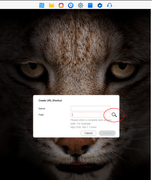
Hi TM, if possible, when right clicking the mouse in the desktop and selecting the "Create URL shortcut" option. Can you please add a search button (from all/favorite folders - see mockup with search icon below) to simplify the fact of writing the full location ('
http://192.168.1.1:544/xxxxxxxxxxxx, as per the screenshot below)
Thanks in advance
Re: Create URL shortcut
Posted: 28 Apr 2025, 15:33
by TMzethar
This feature is mainly used for website URLs and Docker image URLs. The functionality you mentioned can be achieved through existing methods.
Please open the corresponding directory in File Manager, create a shortcut for the target directory or file with right click, and you will see its shortcut on the TOS Desktop.
Re: Create URL shortcut
Posted: 28 Apr 2025, 17:54
by koalakoala
ok thanks - there is an opportunity to extend the existing functionality, Thanks again.
Never tried to create a link to a webpage. So I decided to create a link to google. Opened chrome, accessed my TM NAS and created the link. When I clicked the link, it opens a new tab in chrome to show
www.google.com.... Honest question to other forum members, Does anyone else uses this instead of bookmarks in your browser?
Re: Create URL shortcut [Accepted]
Posted: 28 Apr 2025, 18:11
by koalakoala
TMzethar wrote: ↑28 Apr 2025, 15:33
This feature is mainly used for website URLs and Docker image URLs. The functionality you mentioned can be achieved through existing methods.
Please open the corresponding directory in File Manager, create a shortcut for the target directory or file with right click, and you will see its shortcut on the TOS Desktop.
Thanks but this seems to be working for second level folders only, see below
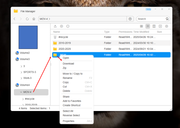
It would be great to be able to click a "VOLUME" to see the "first/top level folders" and then replicate the existing functionality (described in the quote above) to create the shortcuts.
When a VOLUME is clicked, only expands it contents on the left sidebar and offers the
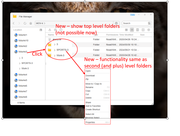
In adittion to that, it would be great to be able to create a shortcut to a VOLUME using the same method.... something like this (see below - yes, I have an F12

)
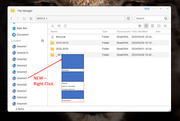
Finally, when creating a shortcut (at least in windows, the idea is that the shortcut OPENS the folder, showing the content of the folder opened via the shortcut). In TM a shortcut SELECTS the folder (it does NOT OPEN IT - requiring an extra enter or interaction to open it), opening the folder containing the folder for what the shortcut was created. If the folder starts with a "Z" you will not able to see it selected (because you need to scroll down)
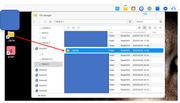
Note: Try this, create +30 folders (more folders than the folders that you can see in your browser without scrolling) and create shortcuts to the fist. middle and last folder. You will see some random behaviours.
Thanks again.
Re: Create URL shortcut
Posted: 28 Apr 2025, 18:48
by TMzethar
It has been submitted to the project team for review and discussion. Thank you for your suggestions.
Re: Create URL shortcut
Posted: 29 Apr 2025, 09:58
by TMLila
koalakoala wrote: ↑28 Apr 2025, 18:11
TMzethar wrote: ↑28 Apr 2025, 15:33
This feature is mainly used for website URLs and Docker image URLs. The functionality you mentioned can be achieved through existing methods.
Please open the corresponding directory in File Manager, create a shortcut for the target directory or file with right click, and you will see its shortcut on the TOS Desktop.
Thanks but this seems to be working for second level folders only, see below
It would be great to be able to click a "VOLUME" to see the "first/top level folders" and then replicate the existing functionality (described in the quote above) to create the shortcuts.
When a VOLUME is clicked, only expands it contents on the left sidebar and offers the
In adittion to that, it would be great to be able to create a shortcut to a VOLUME using the same method.... something like this (see below - yes, I have an F12
)
Finally, when creating a shortcut (at least in windows, the idea is that the shortcut OPENS the folder, showing the content of the folder opened via the shortcut). In TM a shortcut SELECTS the folder (it does NOT OPEN IT - requiring an extra enter or interaction to open it), opening the folder containing the folder for what the shortcut was created. If the folder starts with a "Z" you will not able to see it selected (because you need to scroll down)
Note: Try this, create +30 folders (more folders than the folders that you can see in your browser without scrolling) and create shortcuts to the fist. middle and last folder. You will see some random behaviours.
Thanks again.
Hi!koalakoala!
Thank you for your valuable suggestions.
Regarding your feedback on the “Volume” quick access to the first-level directory function, and the functional requirements of automatically locating and highlighting the corresponding items in the file manager via desktop shortcuts, our development team has officially started the implementation work.The rest of the suggestions have been fully documented and will enter the formal review process.
We will continue to work on optimizing the product experience, and we sincerely thank you for your valuable comments.
Re: Create URL shortcut
Posted: 29 Apr 2025, 12:24
by koalakoala
Thanks TMLila, much appreciated.