Page 1 of 2
TNAS Mobile unable to find NAS Remotely
Posted: 24 Apr 2025, 05:52
by syphon
Hi everyone,
First message here.
I got my first TerraMaster F2-212 a few days ago and I'm setting it up. So far, so good.
However, I encountered a very strange problem during the setup.
My TNAS Mobile application is not able to detect my NAS remotely.
When my phone is connected to the same Wi-Fi network as the F2-212, I can connect to it through the app with no issues at all.
But as soon as I try to reach the NAS from outside my local network, everything stops working.
Here’s what I’ve checked:
I enabled remote access. Registration was successful. I'm using the European server.
Remote connection works via browser. I can reach the NAS by connecting to tnas.online/My_tnas_id.
Remote connection also works with TNAS PC.
So it seems like the issue is only with the mobile app.
I was in contact with Mike from TerraMaster support.
I’ve basically tried everything I could think of:
- Changed the server to "Global" (though I was then unable to reach the NAS from TNAS PC)
Restarted the NAS multiple times
Enabled and re-enabled remote access
Entered the full tnas.online link into the app instead of just the TNAS ID (I get the error: "Check IP and port")
I'm out of ideas.
TOS version: 5.1.73-00078
TNAS Mobile version: 3.3.057
Any help would be appreciated.
Thank you!
Re: TNAS Mobile unable to find NAS Remotely
Posted: 24 Apr 2025, 16:58
by OrionXie
77/5000
I'm very sorry. This reply saved and sent the content that did not conform to your question. I have confirmed this issue with my colleagues before. They said that the user's TNAS id does not support underlines and special characters. I think it should be caused by this problem. I will be more careful next time

Re: TNAS Mobile unable to find NAS Remotely [SOLVED]
Posted: 24 Apr 2025, 18:42
by syphon
Hi OrionXie,
thank you so much for your answer.
I tried installing the App 3.2.47, unfortunately same result.
I reach the NAS from my local network, but I'm not able to reach it from outside through the MOBILE APP.
TNAS PC installed on my PC windows 10 works well in local and remote access.
Checking web browser tnas.online/tnas_id works locally and remotely by PC and Phone as well!
It's the app that seems not to find my tnas id.
Strange fact: yesterday Mike from terramaster support was able to reach it from his own app.
I don't know what to do.
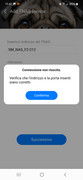
Here a screenshot of my phone app version 3.2.47, message says "check address and port" (Mobile Network)
Re: TNAS Mobile unable to find NAS Remotely
Posted: 24 Apr 2025, 18:55
by EthanLiu
I'm sorry that after receiving your feedback, we tried to reproduce the issue you described using the same device model, the same TOS (operating system) version, and the same TNAS mobile app, but failed to do so. We suggest that you carefully check whether the remote access address is entered correctly and confirm whether your TNAS mobile app has network access permission.
Re: TNAS Mobile unable to find NAS Remotely
Posted: 24 Apr 2025, 21:34
by syphon
Hi EthanLiu,
I finally changed the Tnas ID and now it works.
I chose one without underscores or hyphens, not sure if it is related, but now the mobile app works as expected.
Thanks for the support.
Re: TNAS Mobile unable to find NAS Remotely
Posted: 25 Apr 2025, 09:45
by TMtina
syphon wrote: ↑24 Apr 2025, 21:34
Hi EthanLiu,
I finally changed the Tnas ID and now it works.
I chose one without underscores or hyphens, not sure if it is related, but now the mobile app works as expected.
Thanks for the support.
Thank you for your feedback! We're delighted to know that you've successfully updated your TNAS ID and resolved the connection issue with TNAS mobile.
In earlier versions of the TOS system, to align with the standard specifications of internet domain names, the naming rule for TNAS ID no longer supports the use of underscores (_). All you need to do is remove the underscores from your original TNAS ID, and it will work normally.
Re: TNAS Mobile unable to find NAS Remotely
Posted: 27 May 2025, 18:21
by clazh
TNAS mobile when activated displays Tnas devices Loading no response just hangs using TOS version 4-2-44- model F2-221 Device name TNAS1159
Re: TNAS Mobile unable to find NAS Remotely
Posted: 27 May 2025, 18:36
by davidvisokey
If your TNAS Mobile app can't find your NAS remotely, make sure Remote Access is enabled on your device and your internet connection is stable. Also, verify that your TNAS ID is correctly set up in the app. Restarting the app and router may help resolve the issue.
Re: TNAS Mobile unable to find NAS Remotely
Posted: 27 May 2025, 23:50
by servit00
good morning friends. i have same problem. i named servit00 my server id and i insert:
https://TNAS.online/MYNAME but address or door are incorrect for tnas android app. if i go same address from wifi it works. the remote access is enable. please help me. thanks
Re: TNAS Mobile unable to find NAS Remotely
Posted: 28 May 2025, 00:22
by TMzethar
We have noticed your recent comments.
This TNAS ID is inaccessible. It appears that you haven't enabled the TNAS.online service.
Has your NAS successfully connected to the internet?
You can check the connection status of the TNAS.online service by accessing it through TNAS.online/TNAS ID on a remote PC browser or mobile browser.
Additionally, it is not recommended to share your TNAS ID on public online forums. For security reasons, please change your TNAS ID.