[Help] D4-320 Can't Initialize Disks
Posted: 11 Apr 2025, 11:42
Hi All
Just bought a new D4-320 along with two brand new WD Red PLUS 8 TB drives and mounted them in the DAS and connected to them to my Win 11 box. Device manager detects two generic TerraMAS TDAS SCSI Disk Devices in control panel, but when I go to initialize either of them in Disk Management it throws out a "Data error (cyclic redundancy check) error message and won't let me format/add the drives.
I moved the DAS over to my Win 10 box and I have the same issue, doesn't matter if I have one or both drives inserted into the DAS. Power cycling, rebooting, moving drive bays, checking for updated drivers does nothing. I highly doubt it's an issue with the drives since they are brand new out of box and both have the same issue with the D4-320.
Has anyone else ran into this when adding brand new drives? Any help would be appreciated!
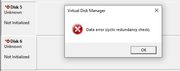
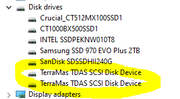
Just bought a new D4-320 along with two brand new WD Red PLUS 8 TB drives and mounted them in the DAS and connected to them to my Win 11 box. Device manager detects two generic TerraMAS TDAS SCSI Disk Devices in control panel, but when I go to initialize either of them in Disk Management it throws out a "Data error (cyclic redundancy check) error message and won't let me format/add the drives.
I moved the DAS over to my Win 10 box and I have the same issue, doesn't matter if I have one or both drives inserted into the DAS. Power cycling, rebooting, moving drive bays, checking for updated drivers does nothing. I highly doubt it's an issue with the drives since they are brand new out of box and both have the same issue with the D4-320.
Has anyone else ran into this when adding brand new drives? Any help would be appreciated!