Page 1 of 2
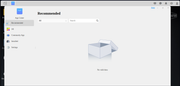
App Center Empty
Posted: 10 Apr 2025, 00:43
by RachelF42
I just got my F2-212 set up, and it's working great, except the App Center is completely empty
I found
a previous thread where people were having the same problem but none of the listed solutions work and the manual download links provided don't work anymore

My DNS is set to
quad9.net but I have also tested Cloudflare and Google, no dice
Re: App Center Empty
Posted: 10 Apr 2025, 09:56
by TMzethar
Are other network functions like TNAS.online or email notifications working?
You can also try using DHCP to automatically obtain network configuration, or manually configure the network by referring to the network settings of a PC on the same network.
Please use the ping command in Terminal to check the latency with the APP server.
If you still cannot obtain the app information, you can refer to the share link I sent you privately to get the app list with which you can manually install the apps.
Re: App Center Empty
Posted: 11 Apr 2025, 04:56
by RachelF42
TNAS.online settings refuse to save
SSH access is now enabled and I can log in just fine
I cannot ping app.terra-master.com, either by domain name or by querying the current IP from my desktop and pinging that directly
I cannot ping 9.9.9.9 either, and both are pingable from my desktop
I've double-checked my network settings and set them to manual instead of DHCP, no change in symptoms
I was able to successfully install Docker by downloading the TPK from the link you PMd me, but am unable to pull any images
The TNAS is plugged in directly to the ISP router with the provided ethernet cable and I continue to have zero problems with the SMB shares
Re: App Center Empty
Posted: 11 Apr 2025, 15:51
by TMzethar
Have you set up any special proxy for your network?
Not all countries or regions can access the Docker Hub website smoothly to get the list of images.
Re: App Center Empty
Posted: 12 Apr 2025, 08:13
by RachelF42
Nope, I don't normally use any kind of proxy
I can't seem to ping anything outside of my LAN from the TNAS, and I'm not having issues with Docker on my main server, so it's not Docker-specific
Re: App Center Empty
Posted: 12 Apr 2025, 15:03
by EthanLiu
How is your currently used NAS device connected to the network? Please check the network connection status through the data dashboard on the right side of the desktop or the "Overview" function in the control panel. Please confirm that the connected router can normally access the Internet. If the issue remains unresolved (i.e., the NAS still cannot connect to the Internet), you may try replacing the network switch device or switching to another network interface for testing.
Re: App Center Empty
Posted: 12 Apr 2025, 16:59
by Gremlin
Security Isolation Mode enabled?
Re: App Center Empty
Posted: 13 Apr 2025, 00:04
by crisisacting
Gremlin wrote: ↑12 Apr 2025, 16:59
Security Isolation Mode enabled?
Was also going to inquire about that; it really does read like it might be in that mode based on the responses of @
Re: App Center Empty
Posted: 13 Apr 2025, 04:39
by RachelF42
Gremlin wrote: ↑12 Apr 2025, 16:59
Security Isolation Mode enabled?
Security Isolation Mode has been disabled the whole time
EthanLiu wrote: ↑12 Apr 2025, 15:03
How is your currently used NAS device connected to the network?
Directly to the ISP-provided router, via the ethernet cable that came in the TNAS box
EthanLiu wrote: ↑12 Apr 2025, 15:03
Please check the network connection status through the data dashboard on the right side of the desktop or the "Overview" function in the control panel.
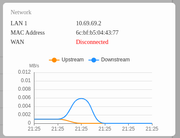
EthanLiu wrote: ↑12 Apr 2025, 15:03
Please confirm that the connected router can normally access the Internet.
I have an upcycled laptop acting as a Proxmox server connected that way too, it can access both the internet and the SMB shares on TNAS fine
My desktop is connected via WiFi and also has no issues with internet or SMB
EthanLiu wrote: ↑12 Apr 2025, 15:03
you may try replacing the network switch device or switching to another network interface for testing.
I would rather exhaust all other options before replacing my router since it's only the TNAS having issues
Re: App Center Empty
Posted: 13 Apr 2025, 05:28
by Gremlin
This symptom of WAN being "disconnected" has come up previously. IIRC that was due to using VPN/Tailscale/similar with a configuration issue. Maybe a forum search is in order.