[Help] BTRFS Error
Posted: 05 Apr 2025, 18:12
F4-423 running TOS 6.0.650, recently installed.
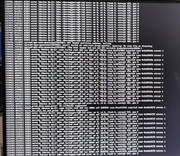
The HDMI is currently outputting the following:
[77957.######] BTRFS error (device dm-2): bdev /dev/mapper/vg0-lv0 errs: errs: wr0, rd 0, flush 0, corrupt 241, gen 0
The ###### represents a 6 digit number that is different every time, the Corrupt 241 generally increases by one but occasionally jumps to i.e 249 then 275 single digits to 284 then a jump to 336. The monitor i full of a this string top to bottom with 241 at the top and 462 on the bottom. I do not know what the frequency is of new lines being added.
I was previously running TOS 5. It kept having issues where it would slow to a crawl then eventually crashed and my data was lost. I learned from that and am currently running an updated back up. if it wasn't for that "corrupt ###" i wouldn't be concerned. But I am, any recommendations?
Thanks, M
The corruption may count may be going up as a result of my backup. My latest backup, utilizing TFM backup version 1.0.124 was "Partial Success (805/812)"
The HDMI is currently outputting the following:
[77957.######] BTRFS error (device dm-2): bdev /dev/mapper/vg0-lv0 errs: errs: wr0, rd 0, flush 0, corrupt 241, gen 0
The ###### represents a 6 digit number that is different every time, the Corrupt 241 generally increases by one but occasionally jumps to i.e 249 then 275 single digits to 284 then a jump to 336. The monitor i full of a this string top to bottom with 241 at the top and 462 on the bottom. I do not know what the frequency is of new lines being added.
I was previously running TOS 5. It kept having issues where it would slow to a crawl then eventually crashed and my data was lost. I learned from that and am currently running an updated back up. if it wasn't for that "corrupt ###" i wouldn't be concerned. But I am, any recommendations?
Thanks, M
The corruption may count may be going up as a result of my backup. My latest backup, utilizing TFM backup version 1.0.124 was "Partial Success (805/812)"