Why is my storage pool array synchronization taking so long?
Posted: 31 Mar 2025, 10:42
Applicable Versions: TOS 5/TOS 6
Applicable Models: All TNAS Series
1. What is Array Synchronization?
Array synchronization refers to the process where the system automatically redistributes data across all disks when operations such as disk replacement, expansion, or repair are performed on a storage pool array.
2. What Are the Impacts of Array Synchronization?
- Array synchronization consumes disk I/O resources, which may cause slowdowns or lag when reading/writing files or running applications during the process.
- Synchronization is a critical process for ensuring data security. While it may temporarily affect performance, normal operation will resume once completed. It is recommended to schedule synchronization during low-activity periods to minimize impact.
3. When Does an Array Require Synchronization?
Redundant arrays require synchronization during these operations to ensure data redundancy and integrity: array creation, repair, disk addition, online migration, online expansion, and rebuilding.
Arrays with Redundancy: TRAID+, TRAID (when disk count ≥ 2), RAID 1, RAID 5, RAID 6, RAID 10.
Arrays without Redundancy: TRAID (when disk count = 1), Single, JBOD, RAID 0.
4. How Long Does Array Synchronization Take?
Synchronization time depends on the following factors:
- Disk capacity: Larger capacities take longer (e.g., 10 TB disks may require hours to days).
- Disk performance: SSDs synchronize faster than HDDs.
- Workload: Frequent read/write operations during synchronization may slow the process.
- Synchronization speed: Limited by the disk's native read/write performance.
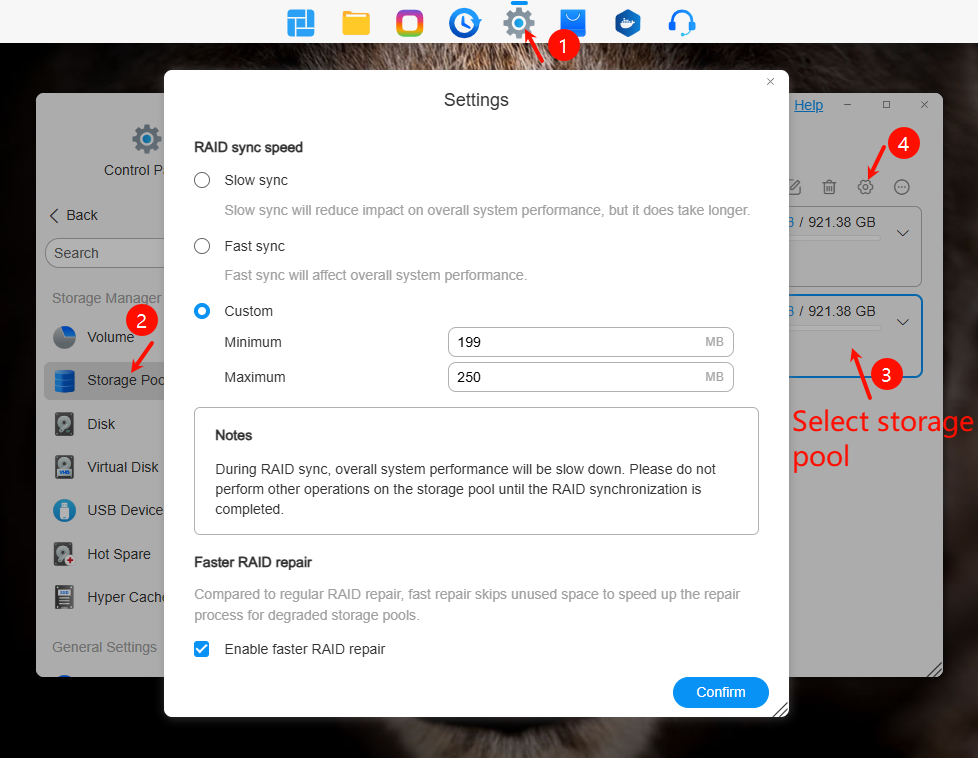
5. How to Accelerate Synchronization in TOS?
① Adjust Synchronization Speed
Path: Storage Management > Storage Pool > Settings > Array Sync Speed
- Options: Fast Sync (100-400 MB/s), Slow Sync (10-50 MB/s), or custom min/max speeds.
- Default sync speed: 50-200 MB/s.
- Actual speed is still constrained by disk performance.
Path: Storage Management > Storage Pool > Settings > RAID Fast Repair
- Skips unused space to speed up synchronization.
- Must be enabled before synchronization begins.
6. Example: RAID 1 Sync Time Estimation
Scenario: Two 1 TB disks in RAID 1, default sync speed (50-200 MB/s).
① Capacity Calculation
- Manufacturer’s nominal capacity: 1 TB = 1000 GB (decimal).
- OS/RAID calculation: 1 TB = 1024 GB (binary).
② Theoretical Time
- 953,344 MB ÷ 200 MB/s ≈ 4,767 s ≈ 79 min.
- Inevitable delays: Speed fluctuations during sustained writes, RAID parity calculations (10%-20% overhead).
- Additional delays: User file operations, background tasks.