Page 1 of 2
(0x80070299) Windows copy file system limitation
Posted: 18 Mar 2025, 10:49
by JonKline
When attempting to copy files to my NAS running TOS 6.0, over the network with SMB using a Windows 11 computer, I get the error:
(0x80070299) The requested operation could not be completed due to a file system limitation
I only get the error for files created with a Blackmagic camera, and only the .mp4 and .braw files. The other files the camera creates can be copied just fine. I get the same error whether copying the files directly from the camera on the network, or when copying the files from my local drive to the Terramaster.
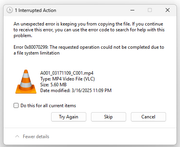
Files created from other devices can be copied without issue.
Re: (0x80070299) Windows copy file system limitation
Posted: 18 Mar 2025, 19:05
by TMzethar
Regarding your question, we are currently unable to make a reliable guess. Could you provide details about your SMB configuration, as well as the TNAS model and TOS version?
Additionally, you may enable the SMB logging feature and check the control panel under logs for any related errors.
Re: (0x80070299) Windows copy file system limitation
Posted: 18 Mar 2025, 19:54
by Gremlin
Compliments of Google AI: {This does, of course, assume the target is Windows but the clues are there (and plausible?)}
Error code 0x80070299 in Windows 11 indicates a file system limitation preventing a requested operation, often related to writing or deleting files, potentially due to a fragmented disk or a large file.
Here's a breakdown of the issue and potential solutions:
What the Error Means:
The error message "The requested operation could not be completed due to a file system limitation" means that Windows encountered a problem while attempting to write to or interact with a file or directory.
This can happen when trying to copy, move, or delete files, or when a program attempts to write data to a specific location.
The error can also occur when the disk is highly fragmented or the file is too large.
Possible Causes:
Disk Fragmentation:
A fragmented hard drive can make it difficult for Windows to allocate space for new files or to write to existing ones.
Large Files or Volumes:
Trying to write a very large file to a disk that doesn't have enough contiguous space can trigger this error.
File System Issues:
There might be underlying problems with the file system itself, such as corruption or errors.
Driver Issues:
Outdated or corrupted drivers for your storage devices can also cause file system problems.
Permissions Issues:
You might not have the necessary permissions to write to a specific location or file.
Troubleshooting Steps:
1. Run Disk Check (chkdsk):
Open Command Prompt as an administrator.
Type `chkdsk /f /r C: ` (replace "C:" with the drive letter you suspect) and press Enter.
This command will scan the disk for errors and attempt to fix them.
2. Defragment the Disk:
Open Disk Defragmenter.
Select the drive you suspect and click "Analyze" and then "Defragment".
3. Update Drivers:
Go to Device Manager (search for it in the Start menu).
Expand "Disk drives" and update the drivers for your storage devices.
4. Check for Corrupted System Files:
Open Command Prompt as an administrator.
Type sfc /scannow and press Enter.
This command will scan for and repair corrupted system files.
5. Check Disk Space:
Ensure you have enough free space on the drive where you're trying to write the file.
6. Try a Different Location:
Attempt to copy or write the file to a different location on the same drive or a different drive to see if the issue persists.
7. Check for Permissions:
Ensure you have the necessary permissions to write to the target location or file.
8. Check for Large Files:
If you're trying to copy or write a very large file, try breaking it up into smaller chunks or using a different method to transfer the file.
9. Restore System:
If the problem started recently, try restoring your system to a previous point.
10. Reset the System:
As a last resort, you can try resetting your system to factory settings.
Re: (0x80070299) Windows copy file system limitation
Posted: 19 Mar 2025, 11:39
by JonKline
Using the Terramaster F8 SSD Plus
v 6.0.500-00120
SMB Configuration
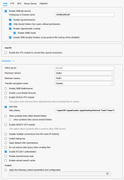
The volume is formatted EXT4 and has 5TB of free space.
I can't figure out how to turn on logging or find a SMB log.
As a troubleshooting step, I uploaded the file to Google Drive, and downloaded it locally, and that version of the file can be copied to the NAS without issue.
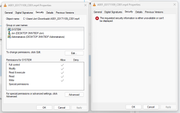
I think the issue may be related to file security settings. The security settings on the left are for the version of the file that can be copied. The security settings on the right are for the original version of the file that can't be copied.
Re: (0x80070299) Windows copy file system limitation
Posted: 19 Mar 2025, 12:01
by JonKline
I also tried FTP and that method works without issue.
Re: (0x80070299) Windows copy file system limitation
Posted: 02 Apr 2025, 01:00
by ArtMetz
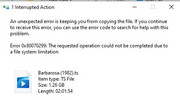
I am also running into this issue trying to copy a video recording to my NAS. I can copy the same recording to an older backup NAS I have from another vendor or another windows machine. Log doesn't provide any error information.
I did run Data Scrubbing.
F4-223
TOS 6.0.650/BIOS 5.19
Service DateTime Client-Port Event
SAMBA 4/1/2025 10:40 50753 unlinkat /Volume1/public/videos/movies/Barbarosa (1982)/Barbarosa.(1982).ts ok
SAMBA 4/1/2025 10:40 50753 unlinkat /Volume1/public/videos/movies/Barbarosa (1982)/Barbarosa.(1982).ts:Timing.Info:$DATA ok
SAMBA 4/1/2025 10:40 50753 create_file overwrite_if file /Volume1/public/videos/movies/Barbarosa (1982)/Barbarosa.(1982).ts:Timing.Info ok
SAMBA 4/1/2025 10:40 50753 create_file create file /Volume1/public/videos/movies/Barbarosa (1982)/Barbarosa.(1982).ts ok
SAMBA 4/1/2025 10:40 50753 create_file create file /Volume1/public/videos/movies/Barbarosa (1982)/Barbarosa.(1982).edl ok
SAMBA 4/1/2025 10:40 50753 create_file create dir /Volume1/public/videos/movies/Barbarosa (1982) ok
SAMBA 4/1/2025 10:40 50753 mkdirat /Volume1/public/videos/movies/Barbarosa (1982) ok
Re: (0x80070299) Windows copy file system limitation
Posted: 02 Apr 2025, 18:52
by TMzethar
We have not yet observed the situation you mentioned but will continue to monitor it closely. If you are still experiencing this issue, please contact technical support mailbox or customer service window for remote troubleshooting.
Re: (0x80070299) Windows copy file system limitation
Posted: 09 Apr 2025, 01:14
by ArtMetz
I emailed support yesterday. How long does a response take?
If I 7zip the file and unzip it, I can then copy the file to the NAS...
Re: (0x80070299) Windows copy file system limitation
Posted: 09 Apr 2025, 16:46
by TMzethar
New emails usually receive a response within 24 hours.
If you can provide a link to your forum post, it will help us understand the situation better.
Re: (0x80070299) Windows copy file system limitation
Posted: 03 Jan 2026, 01:35
by jafir
I just ran into this today with my new F6-424 Max.
This issue was caused by the source NTFS files having alternate "streams" that are not supported by the destination filesystem (BTRFS or EXT4).
You can use this tool from Microsoft to delete them:
https://learn.microsoft.com/en-us/sysin ... ds/streams
Something like the following would remove all of the alternate streams from your C: drive:
streams.exe -d -s c:\